
Free Loan Calculator – Instant Monthly Payment 2026
Loan Calculator (Detailed)
Get payment estimates, month-wise summary, payoff time, total interest, interest saved with extra payments, and an optional amortization schedule. Currency selection is for formatting only (no exchange-rate conversion).
In This Article
Use our free loan calculator above to find your exact monthly payment, total interest, and full payoff schedule in seconds — before you sign anything.
Whether you’re planning a personal loan, auto loan, student loan, or mortgage, knowing your numbers upfront is the single most powerful financial move you can make in 2026. This guide explains everything your loan calculator results mean, how to use every feature, and how to pay off your loan years faster with zero extra effort.
What Is a Free Loan Calculator — and Why Does It Matter in 2026?
A free loan calculator is an online tool that computes your monthly payment, total interest paid, and full repayment timeline based on three inputs: loan amount, interest rate (APR), and loan term.
It saves you from the single biggest mistake borrowers make — agreeing to a loan without knowing the true cost.
Why Most Borrowers Lose Thousands Without One
Most lenders quote a monthly payment. They rarely emphasize the total interest you’ll pay over the life of the loan. A $25,000 personal loan at 12% APR over 5 years costs you $8,322 in interest alone — on top of repaying the principal.
Our loan payment calculator shows you both numbers instantly — so you negotiate from a position of knowledge, not guesswork.
What Makes Our Free Loan Calculator Different from Bankrate and Calculator.net
Most calculators online are severely limited. Here’s how ours compares:
| Feature | FinanceAuthorityHub | Bankrate | Calculator.net |
|---|---|---|---|
| Multi-currency support | ✅ 25 currencies (USD, GBP, CAD, AUD, EUR + 20 more) | ❌ USD only | ❌ USD only |
| Biweekly & weekly payments | ✅ Monthly / Biweekly / Weekly | ❌ Monthly only | ❌ Monthly only |
| Extra payments per period | ✅ Yes — see interest saved | ⚠️ Limited | ❌ No |
| One-time lump sum extra payment | ✅ Yes — apply at any payment # | ❌ No | ❌ No |
| Month-wise summary table | ✅ Calendar month grouping | ❌ No | ❌ No |
| Full amortization schedule | ✅ With CSV download | ⚠️ Basic view | ✅ Basic |
| Calendar payoff dates | ✅ With start date input | ❌ No | ❌ No |
| Interest saved with extra payments | ✅ Baseline vs extra comparison | ❌ No | ❌ No |
Our tool is built for borrowers who want the full picture — not just a payment number. According to the Consumer Financial Protection Bureau (CFPB), understanding amortization is critical before taking on any installment loan.
How to Use Our Free Loan Calculator — Step-by-Step
Using our loan payment calculator takes under 60 seconds. Here’s exactly how:
Step 1 — Select Your Currency
Choose from 25 currencies including USD, GBP, CAD, AUD, and EUR. Currency selection formats all outputs correctly. No exchange-rate conversion is applied — it’s purely for display.
Step 2 — Enter Your Loan Amount (Principal)
Type the total amount you plan to borrow. Do not include commas. Example: Enter 25000 not 25,000.
Step 3 — Enter Your APR (Interest Rate)
Enter your Annual Percentage Rate as a percentage. Example: 8.5 for 8.5% APR. Not sure about your rate? See our APR vs Interest Rate guide to avoid overpaying. The Federal Reserve’s G.19 Consumer Credit release publishes current benchmark rates for personal and auto loans.
Step 4 — Set Your Loan Term
Enter years and months separately. A 5-year loan = 5 years, 0 months. A 30-month loan = 2 years, 6 months.
Step 5 — Choose Payment Frequency (Advanced Options)
- Monthly — Standard (12 payments/year)
- Biweekly — 26 payments/year (saves interest, pays off faster)
- Weekly — 52 payments/year (maximum interest savings)
Pro tip: Switching from monthly to biweekly on a $200,000 mortgage at 6.5% APR saves approximately $34,000 in interest over 30 years.
Step 6 — Add Extra Payments (Optional — This Is Where You Save Real Money)
- Extra per payment — e.g., an extra $100 each month goes directly to principal
- One-time extra payment — apply a bonus, tax refund, or inheritance at a specific payment number
- Our calculator shows you exactly how much interest you save vs. the baseline loan
Step 7 — Add a Start Date
Enter your first payment date and the month-wise summary table will group results by real calendar months — not just generic “Month 1, Month 2” labels. This is exclusive to our tool.
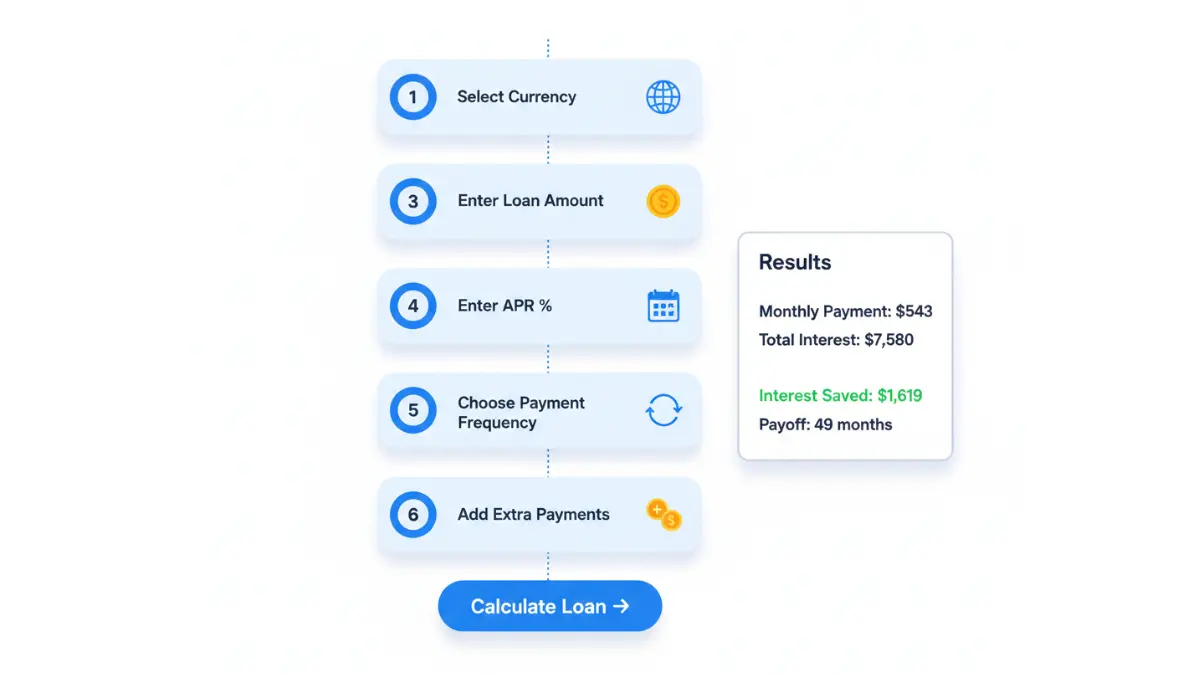
Click “Calculate Loan” — your results appear instantly.
Understanding Your Loan Calculator Results — What Every Number Means
Your free loan calculator returns several outputs. Here’s what each means and why it matters:
Monthly Payment
This is your fixed amount due each period. It combines principal repayment and interest. In the early months of your loan, the majority of every payment goes to interest — not reducing your balance. This is front-loading, and it’s why paying extra early in the loan term saves the most money.
Example: On a $20,000 auto loan at 9% APR over 60 months, your monthly payment is $415. In month 1, $150 goes to principal and $265 goes to pure interest.
Total Interest Paid
This is the number lenders don’t advertise. It’s the true cost of borrowing.
| Loan Amount | APR | Term | Monthly Payment | Total Interest Paid |
|---|---|---|---|---|
| $10,000 | 8% | 3 years | $313 | $1,279 |
| $25,000 | 11% | 5 years | $543 | $7,580 |
| $50,000 | 14% | 7 years | $912 | $26,608 |
Amortization Schedule
This is a payment-by-payment breakdown showing exactly how much of each payment reduces your balance vs. goes to interest. Per the CFPB’s amortization guidance, understanding this schedule helps borrowers make smarter payoff decisions.
Our tool includes a downloadable CSV of your full amortization schedule — something no competitor currently offers for free.
Month-Wise Summary Table
This aggregates multiple payments (biweekly or weekly) into easy-to-read monthly totals. If you add a start date, every row shows a real calendar month like “Feb 2026” instead of “Month 5.”
Interest Saved With Extra Payments
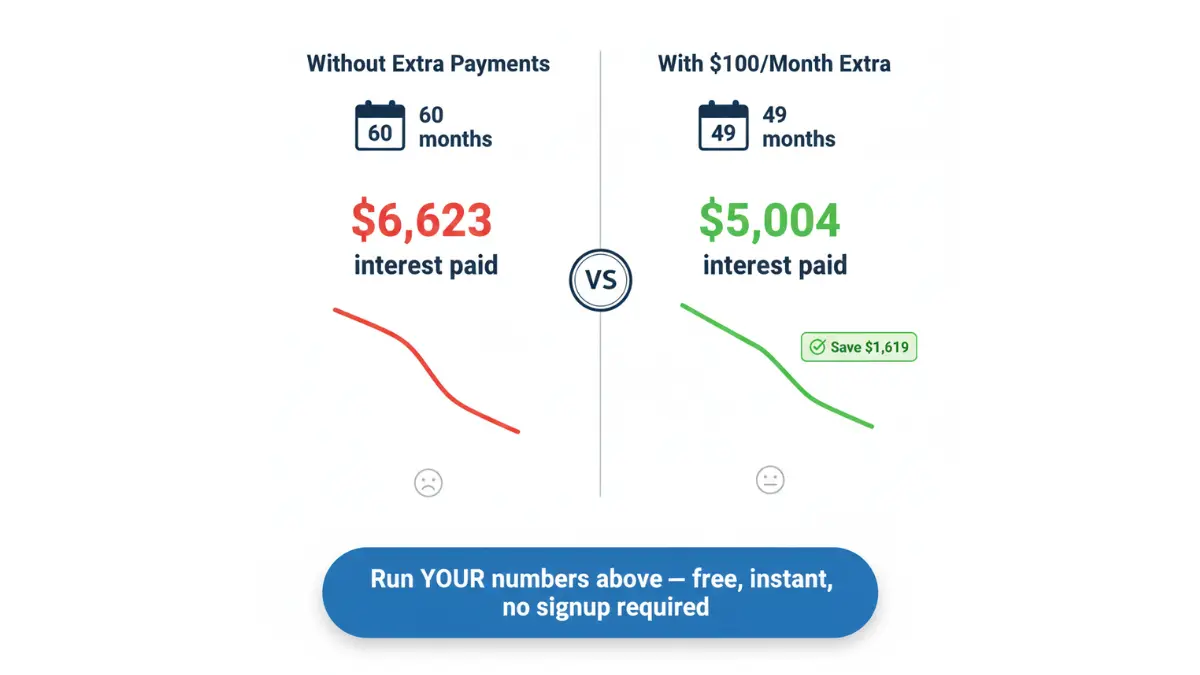
This is your most powerful result. Our calculator shows a direct baseline vs. with-extra comparison, so you see in real dollars how much each extra payment saves.
Example — $25,000 personal loan at 10% APR over 5 years:
| Scenario | Payoff Time | Total Interest | Interest Saved |
|---|---|---|---|
| No extra payments | 60 months | $6,623 | — |
| +$50/month extra | 54 months | $5,711 | $912 saved |
| +$100/month extra | 49 months | $5,004 | $1,619 saved |
| +$200/month extra | 43 months | $3,951 | $2,672 saved |
For borrowers managing multiple loans, our Debt Consolidation Calculator can show whether rolling debts into one loan saves even more.
Loan Calculator by Loan Type — 2026 Rate Guide
Our free loan calculator works for every major loan type. Here are the current benchmark rates across the USA for 2026, sourced from the Federal Reserve’s Consumer Credit G.19 release:
Personal Loan Calculator
Personal loans in the US currently range from 8.5% to 36% APR depending on credit score. Average APR for borrowers with good credit (670–739) sits near 13–17% in 2026. Use our personal loan rates guide to see lender comparisons before you borrow.
Auto Loan Calculator
Average new-car loan APR at commercial banks is approximately 8.5%–9.5% for 60-month loans in 2026. Used-car loans typically run 2–4% higher. Use our dedicated Auto Loan Calculator for vehicle-specific calculations.
Student Loan Calculator
Federal student loan rates for 2025–2026 are set at 6.53% (undergraduate) and 8.08% (graduate PLUS loans) per the U.S. Department of Education. Private student loan rates vary from 4.5% to 15%+ depending on creditworthiness. Run your repayment numbers with our Student Loan Calculator.
Mortgage Loan Calculator
30-year fixed mortgage rates in the US average 6.5%–7.2% in early 2026. For complete mortgage payment calculations including property taxes and insurance, use our full Mortgage Calculator. Planning to refinance? Our Mortgage Refinance Calculator shows break-even points on closing costs.
Business Loan Calculator
Small business loan APRs range from 6.5% to 30%+ in 2026, depending on lender type (SBA, bank, or online). Our Business Loan Calculator handles all business loan types with full amortization outputs.
2026 Benchmark Rate Reference Table (USA)
| Loan Type | Credit Score 760+ | Credit Score 670–739 | Credit Score Below 670 |
|---|---|---|---|
| Personal Loan | 8.5%–12% | 13%–20% | 21%–36% |
| Auto Loan (new) | 6%–8.5% | 9%–13% | 14%–21% |
| Student Loan (federal) | 6.53% (fixed) | 6.53% (fixed) | 6.53% (fixed) |
| Mortgage (30yr fixed) | 6.5%–6.9% | 7%–7.4% | 7.5%+ |
| Business Loan (SBA 7a) | 6.5%–8% | 9%–12% | 13%–15% |
7 Expert Strategies to Pay Off Your Loan Faster — 2026
Every extra dollar paid toward principal eliminates compounding interest from that point forward. These seven strategies, used in combination with our loan payment calculator, can save you thousands.
1. Switch to Biweekly Payments
Instead of 12 monthly payments per year, biweekly means 26 payments — effectively one extra full payment annually. On a $300,000 mortgage at 7% over 30 years, this alone saves over $50,000 in interest and cuts nearly 5 years off the loan.
Run this in our calculator: select “Biweekly (26/year)” under payment frequency to see your exact savings.
2. Add Even $50–$100 Extra Per Month
Small consistent extra payments deliver outsized results due to compound interest working in reverse.
- $50/month extra on a $20,000 loan at 10% over 5 years = $632 saved, paid off 4 months early
- $100/month extra on the same loan = $1,119 saved, paid off 7 months early
3. Apply Tax Refunds as One-Time Extra Payments
The average US tax refund in 2026 is approximately $3,200 according to IRS data. Applying even half of this as a one-time extra payment can eliminate months of interest. Our calculator has a dedicated “One-time extra payment” field — enter the amount and the payment number to apply it.
For more on maximizing refunds, see our Tax Refund 2026 guide.
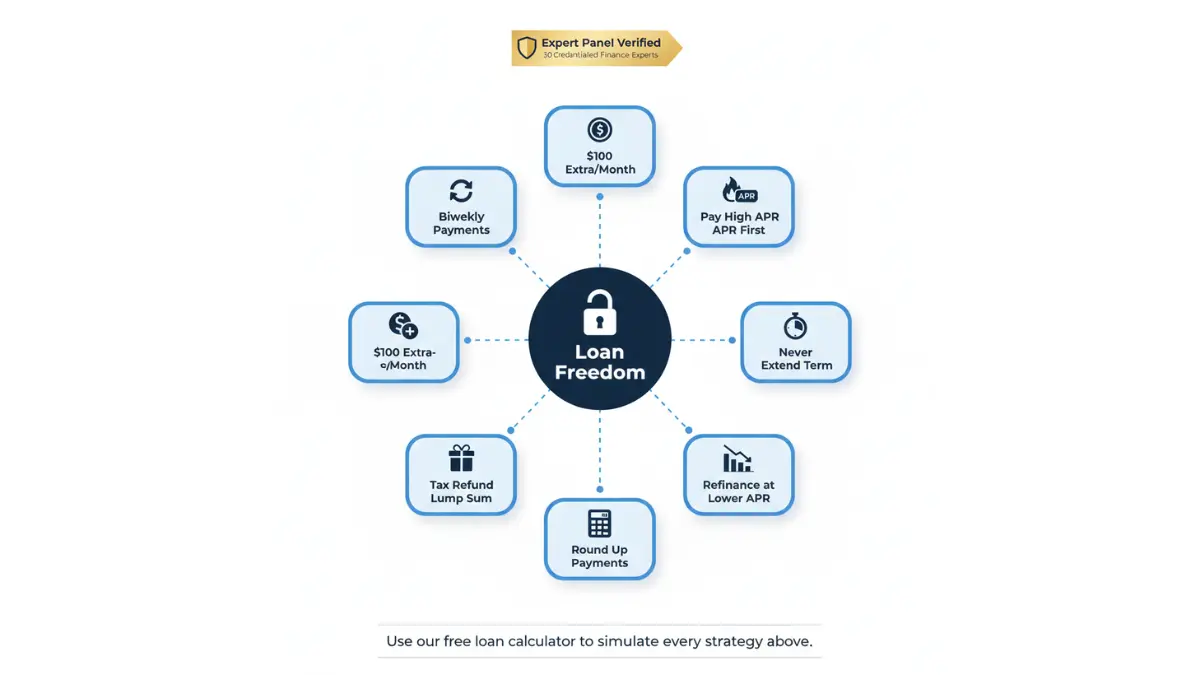
4. Round Up Your Payment
If your monthly payment is $847, pay $900. That extra $53 goes entirely to principal. It barely registers in your monthly budget but accelerates payoff meaningfully over time.
5. Refinance When Rates Drop
If your current loan has an APR above prevailing market rates, refinancing can reduce your payment and total interest. A 2% APR reduction on a $40,000 auto loan saves roughly $3,800 over 60 months. Monitor current rates with the Federal Reserve’s H.15 interest rate release.
6. Never Extend Your Loan Term Without Calculating the True Cost
Lenders sometimes offer lower monthly payments by extending your term. Always run this through our loan interest calculator first — the interest cost increase is almost always substantial.
7. Pay Off High-APR Loans First
If you have multiple loans, prioritize the highest APR loan for extra payments — this is the debt avalanche method. Our full guide on Snowball vs Avalanche debt payoff compares both methods with real examples.
Expert panel insight: Our 30 credentialed finance experts consistently recommend treating extra loan payments as a guaranteed “investment return” equal to your APR — because that’s exactly what it is. Paying down a 14% APR loan delivers a guaranteed 14% return on every dollar, tax-free.
Frequently Asked Questions — Free Loan Calculator 2026
1. What is a free loan calculator?
A free loan calculator is an online tool that computes your monthly payment, total interest paid, and repayment timeline based on loan amount, APR, and term. Our version also calculates biweekly/weekly payments, extra payment savings, and month-wise summaries at no cost.
2. How do I calculate my monthly loan payment?
Enter your loan amount, APR, and term into our free loan calculator above and click “Calculate Loan.” Your exact monthly payment appears instantly, along with total interest and a full amortization breakdown.
3. What is an amortization schedule?
An amortization schedule is a table showing every loan payment broken down into principal and interest portions, with the remaining balance after each payment. Our calculator generates a full downloadable CSV version.
4. Does paying extra reduce loan interest?
Yes — every dollar of extra payment goes directly to principal, which reduces the balance on which future interest is charged. The earlier in the loan term you pay extra, the greater the savings.
5. Can I use this calculator for auto, personal, and student loans?
Yes. Our free loan calculator works for all fixed-rate installment loans including personal, auto, student, mortgage, and business loans. Select the appropriate currency and enter your loan details.
6. What is APR in a loan calculator?
APR (Annual Percentage Rate) is the yearly cost of borrowing expressed as a percentage. It may include interest plus certain fees. Always use APR — not just the stated interest rate — for accurate loan calculations. See our full APR Complete Guide for the complete breakdown.
7. How accurate is an online loan calculator?
Our calculator uses the standard amortization formula used by banks and is accurate for fixed-rate, fully amortizing loans. Results are estimates — actual lender figures may vary due to origination fees, specific compounding policies, or rounding methods.
8. What happens if I pay biweekly instead of monthly?
Biweekly payments result in 26 half-payments per year (equivalent to 13 monthly payments instead of 12). This accelerates payoff and reduces total interest significantly. Select “Biweekly (26/year)” in our calculator’s advanced options to see the exact impact.
9. Can I calculate loans in currencies other than USD?
Yes. Our calculator supports 25 currencies including USD, GBP, EUR, CAD, AUD, INR, JPY, SGD, and more. Select your currency from the dropdown before calculating.
10. What is the difference between principal and interest in a loan?
Principal is the original amount you borrowed. Interest is the cost charged by the lender for lending you that money, calculated as a percentage of your remaining balance each period. Early payments are mostly interest; later payments are mostly principal.
11. How do I use the amortization schedule to plan my budget?
Review the month-wise summary table to see exactly how much you pay each calendar month. Use the schedule to identify the best timing for one-time extra payments — typically early in the loan when balances are highest. Download the CSV and import it into any budgeting tool for detailed planning. For budgeting tools, see our Best Budgeting Apps 2026 guide.
Disclaimer: This article and loan calculator are provided for educational and informational purposes only. They do not constitute financial, legal, or tax advice. Loan payment results are estimates based on the inputs provided and standard amortization formulas. Actual loan costs may vary based on lender fees, compounding methods, credit profile, and applicable regulations. Always consult a licensed financial professional before making borrowing decisions.
Reviewed by the FinanceAuthorityHub expert panel — 30 internationally credentialed finance professionals. Last updated: March 2026.

Informational disclaimer
The content on Finance Authority Hub is provided for general informational and educational purposes only and should not be considered personalized financial, investment, tax, legal, or professional advice. Financial decisions depend on your individual goals, income, risk tolerance, location, and regulatory situation. Before acting on any information, strategy, estimate, or calculator result, consult a qualified licensed professional who can evaluate your specific circumstances.