
W2 Form 2026: Read Every Box + Avoid Costly Mistakes
Learn how to read your W2 form for 2026 tax filing. This comprehensive guide explains all 20 boxes, common employer mistakes costing you money, and step-by-step correction protocols.

In This Article
What Is a W2 Form? (The 60-Second Answer)
A W2 form is your official wage and tax statement that every U.S. employer must provide to employees by January 31 each year. This critical tax document reports your total earnings and the exact amount of federal, state, and payroll taxes withheld from your paychecks throughout the previous year.
Here’s what makes the W2 form essential: The IRS uses this document to verify that you’re reporting accurate income on your tax return and that your employer withheld the correct amount of taxes. In 2026, approximately 182 million W2 forms will be issued across the United States, making it the most common tax document Americans receive.
If you worked as an employee (not an independent contractor), you’ll receive a W2 tax form showing your compensation and tax withholding. The form contains 20 numbered boxes with detailed wage and tax information that directly transfers to your Form 1040 when you file your federal income tax return.
What Makes 2026 Different?
The 2026 tax year brings updated tax brackets and withholding tables that affect how your W2 boxes are calculated. The standard deduction increased to $15,000 for single filers and $30,000 for married couples filing jointly, which impacts how much of your W2 box 1 income is actually taxable.
Critical deadline: Your employer must provide your W2 by January 31, 2026. If you don’t receive it by mid-February, you have legal recourse through the IRS to obtain a substitute form and file your taxes on time. Understanding how to read your IRS Form W-2 correctly can mean the difference between getting your full tax refund or leaving money on the table—or worse, triggering an audit.
Complete Box-By-Box Breakdown
How to Read Your W2 Form: Every Box Explained (2026 Guide)
Learning how to read W2 form boxes correctly ensures you file accurate taxes and claim every deduction you deserve. Here’s your complete decoder for all 20 boxes on your wage and tax statement.
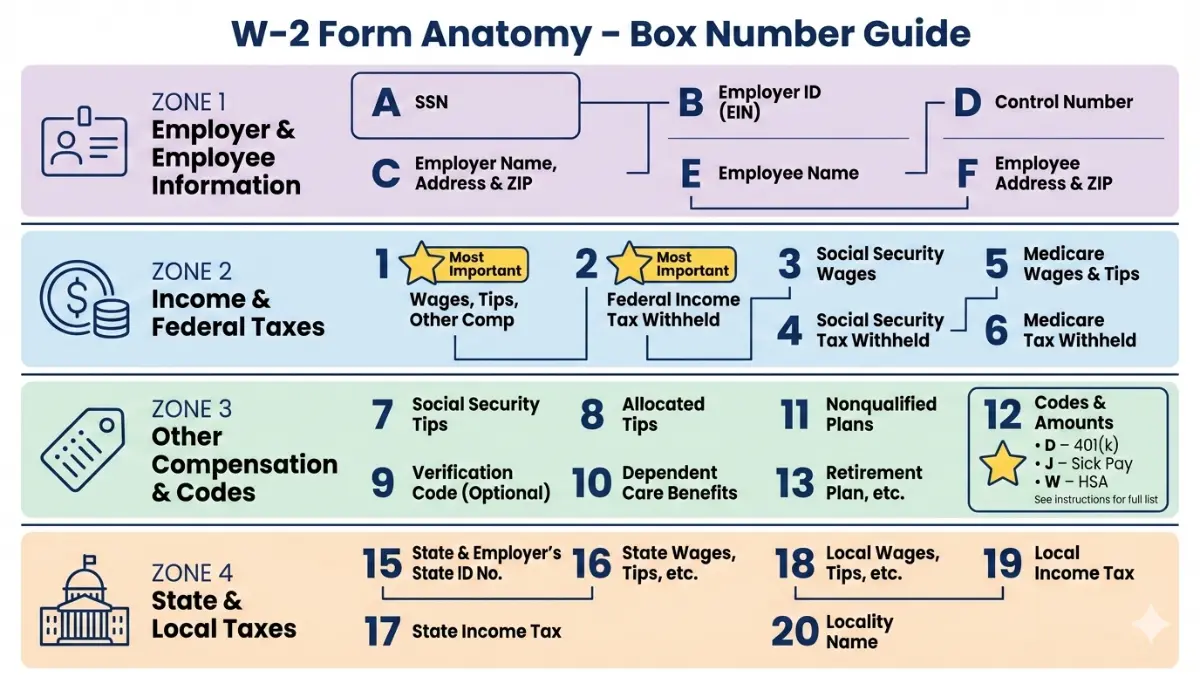
Critical Employer Information (Boxes A-F)
These identification boxes contain your employer’s details and your personal information. Box A shows your Social Security number—verify this matches your Social Security card exactly, as mismatches delay refunds by 8-12 weeks according to IRS processing data.
Box B displays your employer’s EIN (Employer Identification Number), while Boxes C, D, and E show employer name, address, and your personal details. Any errors here require immediate correction through Form W-2c.
Your Income & Withholding (Boxes 1-6)
Box 1 is your taxable federal wages—the most important number on your W2. This figure is typically lower than your gross salary because it excludes pre-tax deductions like 401(k) contributions, health insurance premiums, and HSA deposits.
Real example for 2026: If you earned $60,000 gross pay but contributed $5,800 to your 401(k), your Box 1 on W2 shows $54,200. This is the amount subject to federal income tax, directly impacting your potential refund when combined with the current 2026 tax brackets.
Here’s how the critical boxes break down:
| Box Number | What It Shows | Why It Matters |
|---|---|---|
| Box 1 | Taxable federal wages | Goes directly to Form 1040 Line 1a |
| Box 2 | Federal income tax withheld | Your prepaid federal taxes for the year |
| Box 3 | Social Security wages | Capped at $176,100 in 2026 |
| Box 4 | Social Security tax withheld | Should be 6.2% of Box 3 (max $10,918) |
| Box 5 | Medicare wages | Usually matches Box 1 (no income cap) |
| Box 6 | Medicare tax withheld | Should be 1.45% of Box 5 |
Box 2 shows your total federal income tax withheld—this is the amount you’ve already paid toward your tax bill. If this number is higher than your actual tax liability, you’ll receive a refund. Understanding this relationship helps you optimize your withholding strategy, similar to planning your tax refund 2026 effectively.
Decoder: Box 12 Codes Explained
Box 12 is where employers report various types of compensation and deductions using letter codes. This confusing section trips up millions of taxpayers annually, but understanding W2 form Box 12 codes can unlock hidden tax benefits.
Common Box 12 codes for 2026:
| Code | Meaning | Tax Impact |
|---|---|---|
| D | 401(k) contributions | Reduces taxable income (already excluded from Box 1) |
| DD | Employer health coverage cost | Informational only—not taxable |
| W | HSA contributions | Tax-deductible if employer-funded |
| BB | Roth 401(k) contributions | After-tax (included in Box 1) |
| C | Taxable group-term life insurance | Over $50,000 coverage |
Critical verification: If you contributed to a 401(k) retirement plan, confirm Code D matches your year-end contribution statement. Discrepancies here cost taxpayers an average of $847 in lost deductions annually according to National Taxpayer Advocate reports.
Code DD became mandatory for employers issuing 250+ W2 forms. For 2026, this shows the total cost of your employer-sponsored health coverage—typically $7,800 for single coverage or $22,400 for family coverage. While this amount isn’t taxable, it provides transparency about your total compensation package.
State & Local Tax Boxes (15-20)
Boxes 15-20 report state and local tax information. If you worked in multiple states during 2026, you’ll see multiple entries here, each showing:
- Box 15: State and employer’s state ID
- Box 16: State wages (may differ from Box 1)
- Box 17: State income tax withheld
- Boxes 18-20: Local tax information (city/county)
State-specific variations matter: California includes State Disability Insurance (SDI) in Box 14, while New York applies the “convenience of the employer” rule for remote workers. If you’re comparing income tax 2026 rates across states, Box 17 shows exactly what you paid.
Box 1 Accuracy Check Formula
Verify your Box 1 calculation: Gross Pay – 401(k) – Health Insurance – HSA – Pre-tax Benefits = Box 1
If this doesn’t match, request a corrected W2 immediately—errors here trigger IRS matching notices affecting 4.7 million taxpayers annually.
Common W2 Mistakes & How To Fix Them
8 Costly W2 Mistakes (And How to Avoid Them)
W2 form mistakes cost American taxpayers an estimated $3.1 billion in delayed refunds and penalties each year. Here are the errors that hurt your wallet—and exactly how to fix them.
Real case study: Sarah Martinez from Austin, Texas discovered her employer miscalculated Box 1 by $5,200, excluding her annual bonus from taxable wages. After requesting a corrected W-2c form, she recovered a $3,200 additional refund she would have otherwise missed.
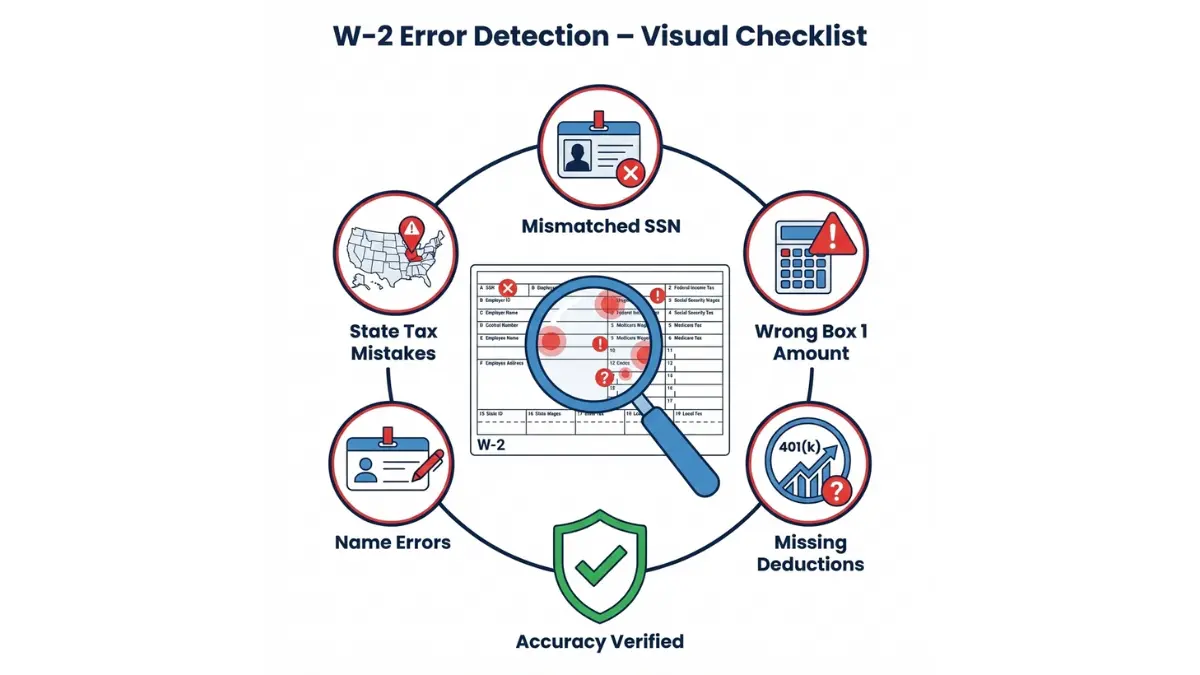
Employer Mistakes That Cost You Money
1. Incorrect Social Security Number
Your SSN mismatch is the #1 reason for IRS rejection letters. The Social Security Administration reported 8.2 million W2 forms with name/SSN mismatches in 2024.
- Impact: 45-90 day refund delay, SSA earnings record gaps
- Fix: Request Form W-2c within 30 days; verify SSN with your Social Security card
2. Wrong Box 1 Calculation
Employers sometimes include non-taxable benefits (like health insurance reimbursements) in Box 1 taxable wages.
- How to verify: Compare Box 1 to your final December paystub’s year-to-date earnings
- Action: Contact HR immediately—corrections take 30-45 days
3. Missing Box 12 Retirement Contributions
If your employer forgot to report your $6,500 401(k) contribution with Code D, you could lose that deduction entirely.
- Cost: $1,430 in unnecessary taxes (22% bracket)
- Resolution: Cross-check against your 401(k) provider statement; request W-2c
4. State Tax Withholding Errors
Multi-state workers face the highest error rates. If you lived in Pennsylvania but worked remotely for a New York company, Box 15-17 must reflect reciprocity agreements to avoid double taxation.
- Timeline: Most states allow amended returns within 3 years
- Tool: Use our debt consolidation calculator if tax errors created unexpected payment obligations
5. Name Mismatch After Marriage
Getting married in 2025 but filing under your new name in 2026 creates IRS rejection risk if your W2 shows your maiden name.
- IRS rejection rate: 73% for name/SSN mismatches
- Requirement: Update SSN records with Social Security Administration before filing taxes
6. Duplicate W2s from Same Employer
System errors during payroll transitions sometimes generate two W2s with different totals.
- Which to use: The one matching your final paystub
- Action: Contact employer to void incorrect version
7. Box 2 Under-Withholding
If your federal income tax withheld in Box 2 is less than 90% of your actual tax liability, you’ll owe penalties.
- Penalty: 0.5% monthly on underpayment
- 2026 adjustment: File new Form W-4 to increase withholding
8. Missing or Late W2
Haven’t received your W2 form by February 15, 2026? You have options.
- Step 1: Contact employer HR by February 7
- Step 2: File IRS Form 4852 as W2 substitute by March 1
- Employer penalty: $310 per late W2 ($640 if intentional)
What to Do If Your W2 Is Wrong
Correction protocol (step-by-step):
- Contact employer within 14 days of receiving incorrect W2
- Request Form W-2c (Corrected Wage and Tax Statement)
- Timeline: Employers have 30 days to issue corrections
- File amended return: Form 1040-X if you already filed
- IRS notification: Happens automatically when W-2c is processed
Download: Sample W-2c request letter template from the IRS correction guidelines.
W2 Accuracy Checklist (12-Point Verification)
Before filing your taxes, verify these elements:
✅ SSN matches Social Security card exactly
✅ Name spelling correct (especially after marriage/legal change)
✅ Box 1 = Gross pay – pre-tax deductions
✅ Box 2 withholding matches paystub YTD total
✅ Box 3 doesn’t exceed $176,100 (2026 SS wage cap)
✅ Box 4 = 6.2% of Box 3 (within $1 tolerance)
✅ Box 12 codes match your contribution records
✅ State information (Boxes 15-17) accurate
✅ Employer EIN and address current
✅ Multiple W2s (if applicable) all received
✅ Box 14 local taxes match locality
✅ No duplicate W2s from same employer
Understanding potential W2 correction needs is as important as knowing your 1099 form types and deadlines if you have additional income sources.
W2 Vs Other Tax Forms + Multi-job Scenarios
W2 vs 1099: Which Form Should You Get?
The difference between receiving a W2 vs 1099 determines your tax obligation, benefits eligibility, and employer protections. Misclassification costs workers an estimated $2.8 billion annually in lost benefits and higher taxes.
Side-by-side comparison:
| Feature | W2 Employee | 1099 Independent Contractor |
|---|---|---|
| Tax withholding | Automatic (employer handles) | None (you pay quarterly) |
| Employer payroll taxes | Employer pays 7.65% | You pay full 15.3% self-employment tax |
| Benefits eligibility | Health, 401(k), unemployment | Must self-fund everything |
| Tax forms filed | Form 1040 + W2 | Form 1040 + Schedule C + SE |
| Audit risk | 0.4% of returns | 1.6% of returns |
| Tax deductions | Limited (standard/itemized) | Business expenses deductible |
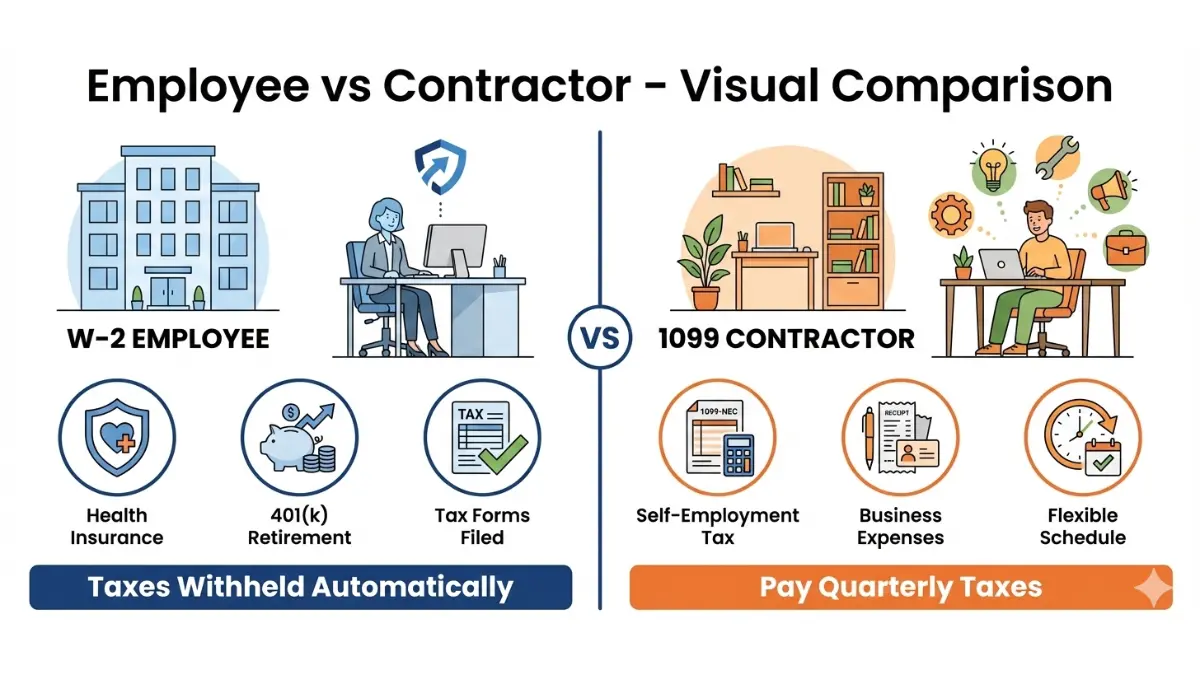
The Employee Classification Test
The IRS uses a 3-factor test to determine worker classification:
- Behavioral control: Does the company direct how you work?
- Financial control: Who provides tools, bears business risk?
- Relationship type: Written contracts, benefits, permanency
Misclassification consequences: If you should have received a W2 form but got a 1099 instead, you can file IRS Form SS-8 to challenge classification. The Department of Labor investigates these cases, potentially recovering unpaid overtime and benefits.
Gig Economy Workers: Why This Matters
Uber, Lyft, and DoorDash drivers typically receive 1099 forms, but some states are changing this. California’s AB5 law (updated in 2026) requires app-based companies to provide W2s to workers who:
- Work 20+ hours weekly
- Serve single-company routes exclusively
- Don’t set their own rates
Tax impact: As a W2 employee, your employer withholding covers Social Security and Medicare automatically. As a 1099 contractor, you pay the full 15.3% self-employment tax on top of income tax—a $4,590 difference on $30,000 earnings.
Multiple W2 Forms: Tax Filing Strategy
Filing taxes with multiple W2 forms requires strategic planning to avoid overpayment and maximize refunds.
What changes with 2+ W2s:
- Combined income reporting: Add all Box 1 amounts together for total taxable wages
- Social Security wage cap: $176,100 maximum for 2026—if your combined Box 3 exceeds this, you overpaid FICA taxes
- Refund opportunity: Excess FICA withholding is fully refundable (claim on Form 1040)
- Standard deduction: Still applies once ($15,000 single, $30,000 married) regardless of W2 count
- Bracket creep risk: Combined income may push you into higher tax brackets
The Math Behind Multiple Jobs
Real scenario for 2026:
- Job 1: $45,000 in Box 1 (primary employment)
- Job 2: $28,000 in Box 1 (part-time position)
- Combined total: $73,000 taxable income
Tax bracket impact: Individually, each job withholds at the 12% bracket. Combined, your income hits the 22% bracket ($48,475+ for single filers in 2026). This creates under-withholding of approximately $2,420—you’ll owe at tax time unless you adjusted your Form W-4.
Withholding adjustment strategy: File new W-4 forms at both jobs using the IRS Multiple Jobs Worksheet or their online calculator to avoid year-end surprises.
FICA refund calculation: If Job 1 withheld $6,200 (Social Security tax) and Job 2 withheld $4,718, your total is $10,918—exactly at the 2026 cap. But if combined Box 4 totals exceed $10,918, the IRS automatically refunds the excess when you file.
Planning multiple income streams? Our mortgage affordability calculator factors in all W2 income sources to determine your home buying power.
How To Access & Use Your W2
Getting Your W2: Digital Access + Lost Form Solutions
Accessing your W2 online is faster and more secure than waiting for mail delivery. Here’s exactly when and how to get your 2026 W2 form.
When Will I Receive My W2 in 2026?
Official timeline:
- January 31, 2026: Federal deadline—employers must mail or electronically post W2s
- Early-to-mid January: 78% of companies provide W2s (10-14 days before deadline)
- February 15: Contact employer if not received; document your attempt
- March 1: File IRS Form 4852 substitute if employer remains non-responsive
The IRS W2 regulations impose $310 penalties per late W2 ($640 if intentional delay), giving employers strong incentive to meet deadlines.
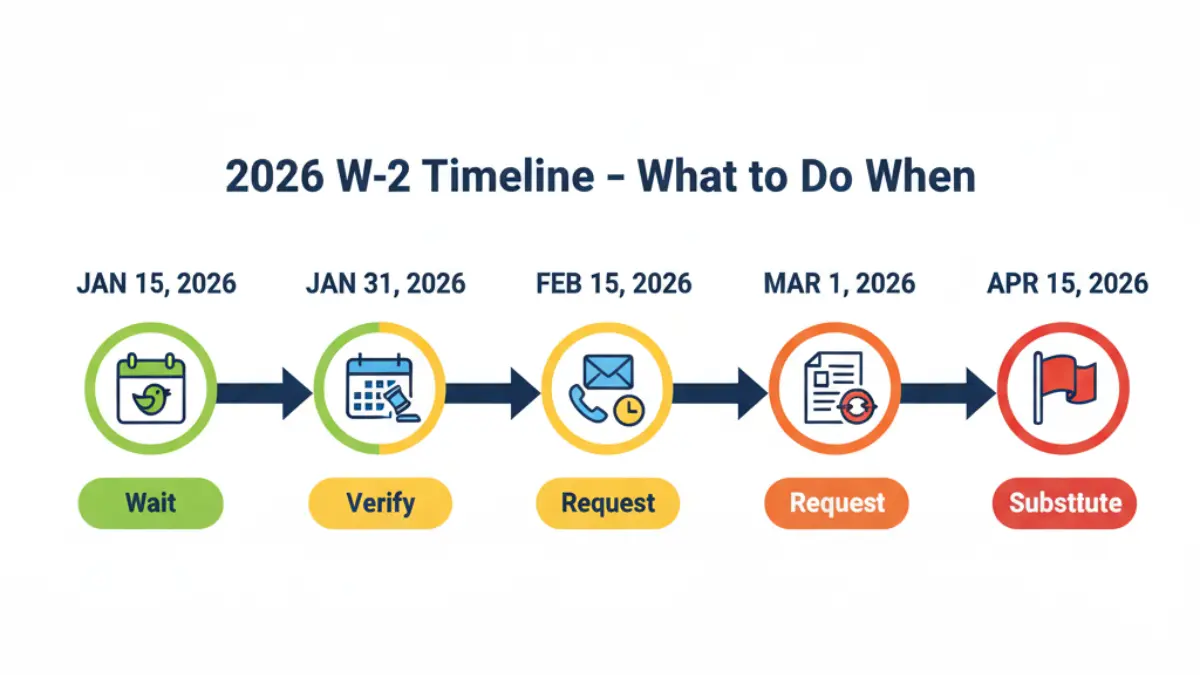
How to Access Your W2 Online
Most employers now provide electronic W2 tax form access through payroll platforms. Here’s how to retrieve yours:
ADP Workforce Now:
- Login at workforcenow.adp.com
- Navigate: Myself → Pay → Tax Statements
- Download PDF (available 7+ years historical)
- Mobile app access: ADP Mobile Solutions
Paychex Flex:
- Access at myapps.paychex.com
- Reports & Docs → Tax Documents → W-2
- Email delivery option available
- Automatic January 15 posting (typically)
Gusto:
- Login to app.gusto.com
- Click: You → Pay → Tax Forms
- Print-friendly format with annotation tools
- W2 preview available mid-January
Other major platforms: Workday (Team → Pay → Tax Documents), UltiPro (Pay → Tax Forms), BambooHR (Files tab → Tax Documents)
Verification portal: The Social Security Administration provides W2 wage verification starting late March—useful for confirming employer reported your earnings correctly.
Lost or Never Received Your W2? Here’s What to Do
Step-by-step recovery protocol:
Week 1 (Feb 1-7):
- Contact employer HR department via email (creates paper trail)
- Request duplicate W2 or electronic access credentials
- 87% of requests resolved within 5 business days
Week 2 (Feb 8-14):
- Send formal written request certified mail
- Reference IRS employer obligations under Publication 1141
- Copy your HR contact and payroll department
Week 3 (Feb 15+):
- File IRS Form 4852 (Substitute for Form W-2)
- Use your final December 2025 paystub as reference
- IRS will contact employer for verification (typically resolves in 10-14 days)
Filing with Form 4852: You can file your tax return using the substitute form, but accuracy is critical. Box 1 should match your final paystub’s year-to-date gross wages minus pre-tax deductions.
Amendment requirement: When your actual W2 arrives (even months later), you must file Form 1040-X if numbers differ from your 4852 estimates.
Getting W2 from Previous Employer
Former employer obligations:
- Legal retention: 4 years from the tax due date
- Your rights: Request copies anytime within retention period
- Response timeline: Reasonable period (typically 30 days)
- Cost: Employers may charge $5-15 for duplicate copies
Non-responsive employer escalation:
- State labor board complaint: Most states have wage/hour divisions that enforce W2 requirements
- IRS Form 4852 filing: Document your employer’s non-compliance
- State tax authority: Report to your state’s department of revenue
Need to track down old W2s for mortgage pre-approval? Lenders typically require 2 years of tax returns with all W2s attached.
W2 Recovery Timeline Flowchart
Missing W2 by Feb 15 → Contact employer → No response in 7 days → File Form 4852 → Continue tax filing → Amend if actual W2 differs
Sample employer request email: “I haven’t received my 2025 W-2 form for [Company Name], EIN [number]. IRS regulations require employers to provide W-2s by January 31, 2026. Please send my W-2 electronically to [email] or mail to [address] within 5 business days. If unable to comply, I will file IRS Form 4852 as required.”
Tax Filing With Your W2 + 2026 Strategy
Using Your W2 to File Taxes (And Maximize Your Refund)
Your W2 for taxes is the foundation of your Form 1040—understanding how the numbers transfer prevents errors and maximizes your refund potential.
Where Your W2 Information Goes on Your Tax Return
Form 1040 mapping (2026 version):
- Box 1 → Line 1a (Wages, salaries, tips)
- Box 2 → Line 25a (Federal income tax withheld)
- Box 17 → State tax withheld section (Schedule A if itemizing)
- Box 12 codes → Various schedules (Schedule 1 for HSA deductions)
Critical connection: Your Box 1 amount of $54,200 becomes your starting point for calculating taxable income. After subtracting the $15,000 standard deduction (2026 single filer), your taxable income is $39,200—placing you solidly in the 12% tax bracket according to current 2026 tax brackets.
E-filing automation: When you use tax software or file through eFile free platforms, your W2 data transfers electronically from the IRS database, reducing manual entry errors by 94%.
2026 Tax Strategy: What Your W2 Reveals
Refund optimization checklist:
✅ Compare Box 2 to actual tax liability: If you withheld $8,200 but only owe $6,400, you’re getting a $1,800 refund
✅ Verify Box 12 retirement contributions: Confirm your $6,500 401(k) contribution (Code D) is documented
✅ Check dependent care benefits: Box 10 shows up to $5,000 in tax-advantaged childcare
✅ HSA contribution limits: Box 12-W should reflect $4,300 individual or $8,550 family max for 2026
✅ Review 2026 W-4 withholding: Adjust if getting huge refund (you’re giving IRS interest-free loan) or owing significantly
Withholding sweet spot: Aim for Box 2 to be 95-105% of your actual tax liability. This maximizes cash flow throughout the year while avoiding underpayment penalties.
Tax planning insight: If your Box 1 shows $73,000 combined from multiple jobs, you’re in the 22% bracket. Contributing an additional $4,000 to your traditional 401(k) could drop you back to the 12% bracket threshold, saving $400 in federal taxes alone.
Maximize your strategy with our tax refund 2026 guide showing exactly how W2 withholding affects your refund timeline.
Red Flags That Trigger IRS Audits
Warning signs on your W2:
- Box 1 significantly below industry average for your occupation (e.g., software engineer showing $35,000)
- Missing Box 12 codes despite high income (suggests unreported retirement contributions)
- Excessive Box 14 deductions without supporting documentation
- State/federal wage discrepancies exceeding $500 (Boxes 1 vs 16)
- Round numbers in Box 2 withholding (suggests estimation rather than actual calculation)
IRS audit rates by income (2025 data):
- Under $50,000: 0.4% audit rate
- $50,000-$200,000: 0.6%
- Over $200,000: 2.8%
W2 matching program: The IRS receives copies of all W2s by February and automatically matches them to tax returns. Discrepancies trigger CP2000 notices affecting 4.7 million taxpayers annually, according to IRS compliance data.
Can You File Taxes Without Your W2?
Yes, using Form 4852—but with important limitations:
Requirements:
- Documented attempts to obtain W2 from employer
- Final paystub from December 2025 showing year-to-date totals
- Records of all employer withholding amounts
Process timeline:
- File Form 4852 substitute by April 15, 2026 deadline
- IRS processing: 6-8 weeks (vs 21 days for standard e-file)
- Amended return required: When actual W2 arrives and differs from estimates
Accuracy is critical: If your Form 4852 underestimates Box 1 income by more than $500, you could face amended return requirements and potential penalties. Download official instructions from IRS Form 4852.
Better option: Most tax software (TurboTax alternatives) can import W2 data directly from employers once available, eliminating manual entry entirely.
2026 W-4 Adjustment Calculator
Use your 2025 W2 to optimize 2026 withholding:
Current situation from W2:
- Box 1: $60,000
- Box 2: $9,200 withheld
- Actual 2025 tax: $6,800
- Result: $2,400 over-withheld = interest-free loan to IRS
2026 adjustment: Reduce withholding by $200/month to achieve near-zero refund while avoiding underpayment penalties. This puts $2,400 back in your monthly budget for retirement savings or debt payoff strategies.
Planning a home purchase? Your W2 Box 1 amount determines mortgage qualification—use our mortgage calculator to see exactly how your wages translate to buying power.
W2 Form FAQs (Quick Answers)
1. What is the difference between W2 and W4?
Form W-4 tells your employer how much tax to withhold from your paychecks; the W2 form reports what was actually withheld and paid throughout the year. You complete a W-4 when starting a new job, while your employer provides your W2 each January for the previous tax year.
2. Do I need to attach my W2 to my tax return?
Not if e-filing—the system transfers your W2 data electronically from the IRS database. If paper filing, attach Copy B to the front page of your Form 1040. Keep Copy C for your personal records for at least 7 years.
3. How long should I keep my W2 forms?
Keep W2s minimum 3 years after filing your tax return (IRS audit window). Better practice: Retain for 7 years if you claimed losses, bad debt deductions, or worthless securities, as these extend audit risk periods per IRS retention guidelines.
4. Can my employer refuse to give me a W2?
No—providing your W2 tax form by January 31 is legally required under IRS regulations. Report non-compliance by calling 800-829-1040 or filing IRS Form 4598-C. Your state labor department can also intervene and impose penalties of $310-$640 per late W2.
5. What if I have 3 W2 forms from different jobs?
Report all three on your tax return by adding each Box 1 amount together for total wages on Form 1040 Line 1a. Check if your combined Box 4 (Social Security tax) exceeds the $10,918 maximum for 2026—excess amounts are fully refundable.
6. Is Box 1 the same as my salary?
No. Box 1 taxable wages equals your gross salary minus pre-tax deductions (401k contributions, health insurance premiums, HSA deposits, FSA contributions). If you earned $60,000 but contributed $5,800 to retirement, Box 1 shows $54,200.
7. Why is my W2 Box 1 higher than my take-home pay?
Box 1 doesn’t subtract taxes or post-tax deductions. Your take-home pay equals Box 1 minus federal income tax (Box 2), FICA taxes (Boxes 4 + 6), state taxes (Box 17), and any post-tax deductions like Roth 401(k) or garnishments.
8. What does Code DD in Box 12 mean?
Code DD shows the total cost of your employer-sponsored health coverage (employer + employee portions combined). This amount is informational only and not taxable under current law. Required reporting for employers issuing 250+ W2 forms annually.
9. Can I get a W2 from 10 years ago?
Contact your former employer first—they’re required to retain W2 records for 4 years minimum. If unavailable, request a wage and income transcript from the IRS (free, covers 10 years) or Social Security Administration earnings record (covers your entire work history).
10. What if my W2 shows the wrong state?
Request an immediate corrected W2 (Form W-2c) from your employer. State tax withholding errors can result in double taxation or underpayment penalties. Most states allow amended returns within 3 years, but correcting the source W2 prevents cascading filing issues.
11. Do I need a W2 if I only worked 2 weeks?
Yes—any employee who earned wages must receive a W2 form regardless of amount or duration worked. Even if you earned $200 for 2 weeks of work, your employer must report this income to the IRS and provide you with proper documentation by January 31.
Disclaimer
This article provides educational information about W2 forms and tax filing for the 2026 tax year. It is not personalized tax, legal, or financial advice. Tax situations vary significantly based on individual circumstances, filing status, income sources, and applicable state laws. For guidance specific to your situation, consult a qualified Certified Public Accountant (CPA), Enrolled Agent (EA), or licensed tax professional. All information is accurate as of February 2026 and reflects current IRS regulations and tax code provisions.
Related Articles
 Tax Filing & Deductions
W-4 Form 2026 Complete Guide: How Tips, Overtime & the $2,200 Child Tax Credit Change Your Paycheck This Year
February 10, 2026 Tax Filing & Deductions
W9 Form 2026: Avoid 24% Penalty + Fill Guide
February 9, 2026 Tax Filing & Deductions
Structured Settlement Payments, Taxes, and Your Rights
May 7, 2026 Tax Filing & Deductions
1099 Form: Types, Deadlines + $340 Penalty (2026)
February 7, 2026 Tax Filing & Deductions
TurboTax Free 2026: Only 37% Qualify — Do You Make the Cut?
February 7, 2026 Tax Filing & Deductions
EFTPS 2026: Individual Shutdown + New Payment Options
February 11, 2026 Tax Filing & Deductions
Tax Refund 2026: Who Gets $1,000 More & How Fast
February 7, 2026 Tax Filing & Deductions
1040 Tax Form 2026: Avoid 7 Costly Filing Mistakes
February 10, 2026 Tax Filing & Deductions
Tax Refund Up 20% in 2026: How to Claim Your $1,000 Starting January 26
January 17, 2026
Informational disclaimer
The content on Finance Authority Hub is provided for general informational and educational purposes only and should not be considered personalized financial, investment, tax, legal, or professional advice. Financial decisions depend on your individual goals, income, risk tolerance, location, and regulatory situation. Before acting on any information, strategy, estimate, or calculator result, consult a qualified licensed professional who can evaluate your specific circumstances.