
Percentage Calculator – Instant & Accurate Results
Percentage Calculator
Solve the most common percentage problems (percent of, what percent, percent change, increase/decrease, reverse percent, and percentage points) with steps, scenarios, and CSV export.
Inputs
Turn this on when your values represent money (prices, salaries, costs).
Results
Scenarios (same inputs)
Results appear after you click “Calculate.”
In This Article
What Is a Percentage Calculator and How Does It Work?
A percentage calculator is a free online tool that instantly solves the most common percentage problems — from finding what percent one number is of another, to calculating percent change, increase, decrease, reverse percentage, and percentage points. Enter your values, select the calculation type, and get accurate results in seconds — no formulas, no math errors.
According to the IRS, your federal income tax is calculated as a percentage of your income in layers called tax brackets — making percentage math one of the most practically important skills in personal finance today.
What This Tool Calculates
| Mode | What It Solves | Example |
|---|---|---|
| P% of Y | Find the part | 20% of $1,500 salary bonus |
| X is what % of Y | Find the percent | $45 tip on $300 bill |
| Percent Change | Old → New difference | Salary went from $60K to $66K |
| Increase/Decrease by % | Apply a percent | Price + 8.5% sales tax |
| Reverse Percentage | Find original value | Price before 10% discount |
| Percentage Points | Direct % difference | Rate moved from 3.5% to 5% |
Why use this percentage calculator?
- ✅ Supports 22 currencies including USD, GBP, EUR, CAD, AUD
- ✅ Shows step-by-step workings for every calculation
- ✅ Includes scenario tables to compare multiple values instantly
- ✅ CSV export for saving and sharing results
- ✅ Mobile-ready — works perfectly on any device
What This Means For You: Whether you’re calculating a salary raise, a mortgage rate change, a store discount, or your investment return, this tool handles every percentage problem you’ll face in daily financial life — faster and more accurately than manual math.
How to Use the Percentage Calculator — Step-by-Step Guide
Using this percent calculator takes under 30 seconds. Here’s exactly how each mode works with real financial examples.
How to Calculate Percentage Man
Mode 1: Find P% of a Number
Use when: You know the percent and the total, and need the actual amount.
- Select “P% of Y” from the dropdown
- Enter the percentage (P) and the total value (Y)
- Click Calculate
Real Example: Your employer offers a 12% performance bonus on your $75,000 salary.
- P = 12, Y = 75,000 → Result: $9,000 bonus
Use the Salary Calculator alongside this to see your full take-home picture.
Mode 2: X is What % of Y?
Use when: You know both the part and the whole, and need the percentage.
- Select “X is what % of Y”
- Enter X (the part) and Y (the whole)
Real Example: You scored 42 out of 55 on a financial literacy test.
- X = 42, Y = 55 → Result: 76.36%
Mode 3: Percent Change (Old → New)
Use when: You want to measure how much something has grown or shrunk.
- Enter the Old value and the New value
- Formula: ((New − Old) ÷ |Old|) × 100
Real Example: Your home’s value went from $320,000 to $358,400.
- Result: +12% increase in home equity
Use the Home Affordability Calculator to see how this affects your buying power.
Mode 4: Increase or Decrease a Value by %
Use when: You need to apply a percent to a base amount.
Real Example: A $28,000 auto loan with a 6.5% annual interest rate applied to the first year’s balance.
Mode 5: Reverse Percentage (Find the Original Value)
Use when: You know the final price after a percent change and need the original.
Real Example: A laptop costs $1,073 after a 15% discount. What was the original price?
- Final = 1,073 ÷ (1 − 0.15) = $1,262.35 original price
Mode 6: Percentage Points
Use when: Comparing two percentages directly (not relative change).
Real Example: Your mortgage rate moved from 6.25% to 7.00%.
- Percentage points change: +0.75 pp
- Relative percent increase: +12% — a much larger actual cost impact
Use the Mortgage Calculator to convert that rate change into real monthly dollar differences.
Quick Reference Table
| Mode | Inputs Needed | Result Gives You |
|---|---|---|
| P% of Y | Percent + Total | The part (dollar/number amount) |
| What % is X of Y | Part + Whole | The percentage ratio |
| Percent Change | Old + New | % growth or decline |
| Inc/Dec by % | Base + Percent + Direction | New value after the change |
| Reverse % | Final + Percent | Original value before change |
| Percentage Points | P1 + P2 | Direct pp difference + relative % |
Percentage Formulas — How to Calculate Percentage Manually
Understanding the percentage formula behind each calculation helps you verify results and apply them confidently in financial decisions.
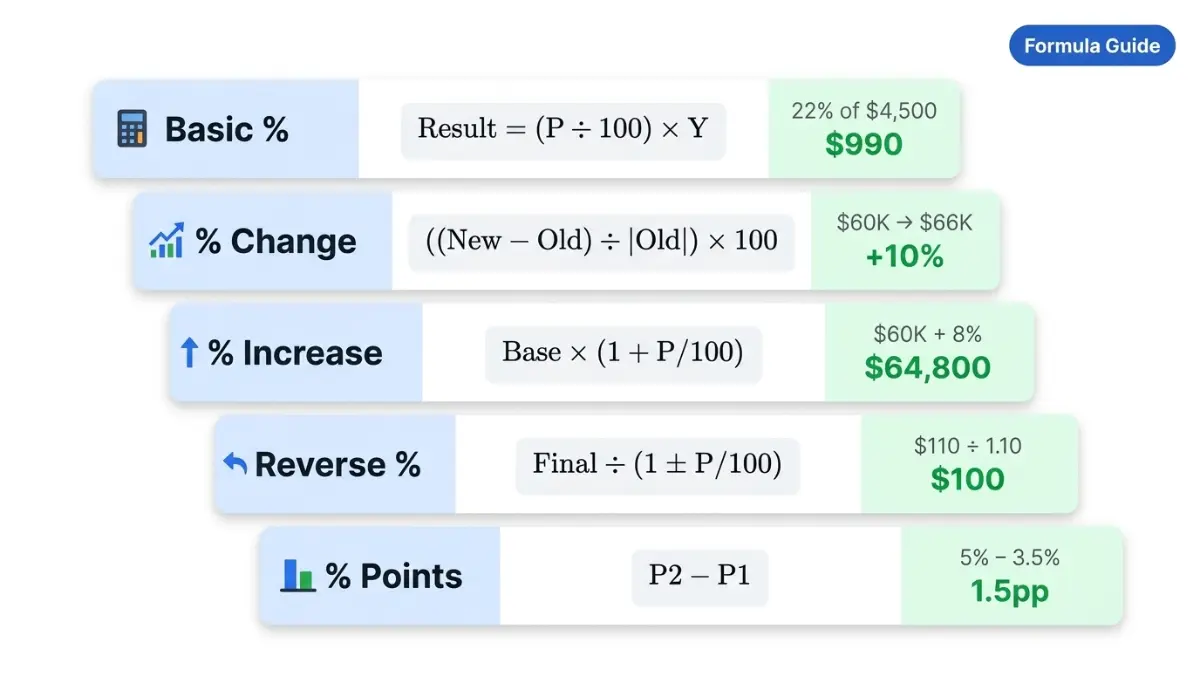
Basic Percentage Formula
Result = (P ÷ 100) × Y
This is the foundation of all percentage calculations.
Example: What is 22% of $4,500 (e.g., federal tax withholding estimate)?
- (22 ÷ 100) × 4,500 = $990
The IRS uses this exact formula structure when calculating federal income tax withholding from your paycheck.
Percentage Change Formula
% Change = ((New − Old) ÷ |Old|) × 100
Example: The U.S. Bureau of Labor Statistics reported that real average hourly earnings increased 1.4% from February 2025 to February 2026. Here’s how that’s calculated:
- If hourly earnings went from $34.20 to $34.68: ((34.68 − 34.20) ÷ 34.20) × 100 = +1.4%
Percentage Increase & Decrease Formula
New Value = Base × (1 + P/100) — for increase New Value = Base × (1 − P/100) — for decrease
Financial Example — Salary Raise:
- Current salary: $60,000 | Raise: 8%
- New salary = $60,000 × (1 + 0.08) = $64,800
- Annual gain = $4,800
Pair this with the Investment Calculator to see how investing that $4,800 raise annually at 7% grows over 20 years.
Reverse Percentage Formula
Original = Final ÷ (1 ± P/100)
Example: A product costs $847 after a 10% price increase. What was the original price?
- Original = 847 ÷ 1.10 = $770
Why it matters: Retailers often show “after” prices. This formula reveals the true base price — critical for negotiating business loans or evaluating vendor pricing.
Percentage Points Formula
PP Change = P2 − P1 Relative Change = (PP Change ÷ |P1|) × 100
Formula Reference Table
| Formula | Use Case | Example |
|---|---|---|
| (P/100) × Y | Find dollar amount | 20% of $5,000 = $1,000 |
| (X/Y) × 100 | Find percent | $45/$300 = 15% |
| ((New−Old)/|Old|)×100 | Measure growth | $80K→$88K = 10% raise |
| Base × (1+P/100) | Apply increase | $200 + 15% = $230 |
| Final ÷ (1±P/100) | Find original | $110 ÷ 1.10 = $100 |
| P2 − P1 | Percentage points | 5% − 3.5% = 1.5pp |
All six modes in our tool apply these formulas instantly — showing you the full working steps so you can verify every result.
How to Use Percentages in Personal Finance — Real Examples (2026)
This is where a percentage calculator goes from a math tool to a money-saving weapon. Here are the six most important financial situations where mastering percentages directly impacts your wallet.
Salary & Pay Raise Negotiations
According to BLS data, U.S. wages and salaries increased 3.3% over the 12-month period ending December 2025. Knowing how to calculate percentage increase in salary helps you benchmark your raise request with real data.
Real Scenario:
- Current salary: $72,000 | Requested raise: 7%
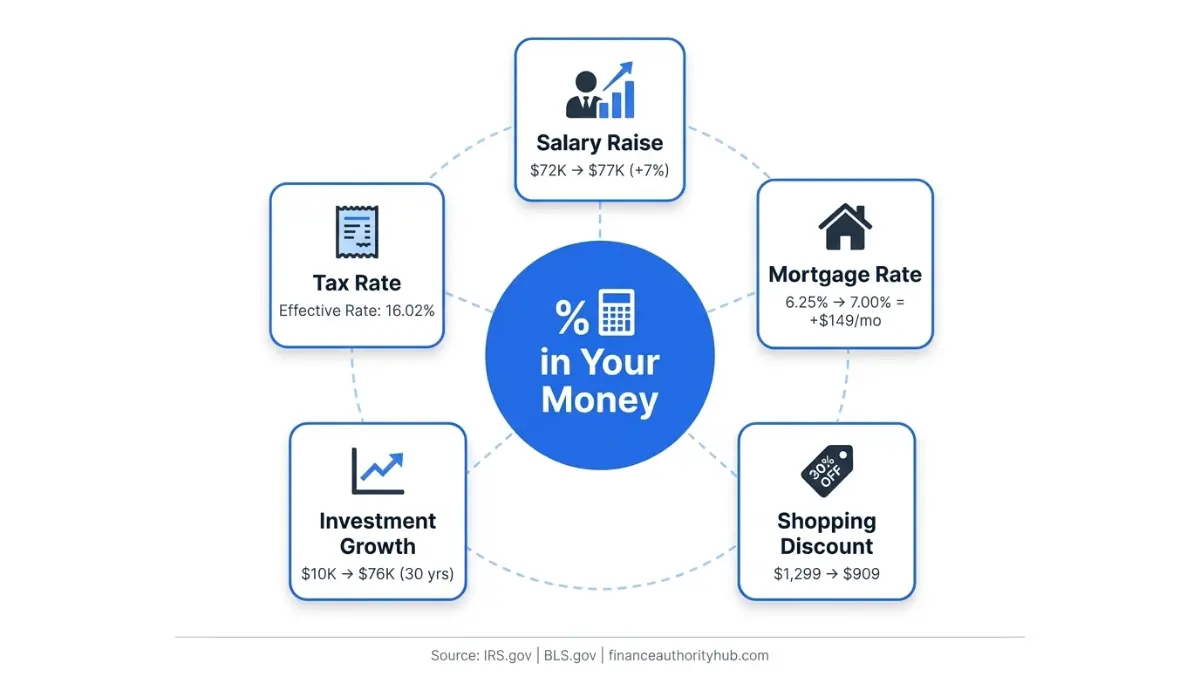
- New salary = $72,000 × 1.07 = $77,040
- Annual gain = $5,040
- Over 10 years, investing that $5,040 annually at 7% = ~$69,500 in additional wealth
💡 Expert Insight — Laura M. Bennett, CFP: “Most employees underestimate their raise by anchoring to inflation alone. Use percentage change data from BLS benchmarks to negotiate from a position of evidence, not feeling.”
Use the Compound Interest Calculator to see exactly how your raise compounds into long-term wealth.
Mortgage Rate Changes — Real Dollar Impact
A 0.75 percentage point change in your mortgage rate sounds small. It isn’t.
| Loan Amount | Rate 6.25% | Rate 7.00% | Monthly Difference | 30-Year Cost Difference |
|---|---|---|---|---|
| $300,000 | $1,847 | $1,996 | +$149/mo | +$53,640 |
| $450,000 | $2,771 | $2,994 | +$223/mo | +$80,280 |
This is the difference between percentage points (0.75pp) and relative percent change (+12%). Lenders use the first; your wallet feels the second. Use the Mortgage Refinance Calculator to run your exact numbers.
Discount & Sale Price Calculations
Black Friday Scenario — 2026:
- TV originally priced at $1,299 with 30% off
- Discount = $1,299 × 0.30 = $389.70
- Final price = $909.30
What retailers don’t tell you: A “30% off” followed by an “extra 20% off” is NOT 50% off.
- Step 1: $1,299 × 0.70 = $909.30
- Step 2: $909.30 × 0.80 = $727.44 (only 44% total discount)
This compounding error is one of the most expensive percentage mistakes consumers make every year.
Investment Returns & Portfolio Growth
Scenario: $10,000 invested in an S&P 500 index fund at a historical average of ~7% real annual return.
| Years | Value at 7% Growth |
|---|---|
| 5 | $14,026 |
| 10 | $19,672 |
| 20 | $38,697 |
| 30 | $76,123 |
The percent increase from year 1 to year 30 = +661%. This is why understanding how to calculate percentage growth is essential for retirement planning.
Tax Calculations (Federal, State, Sales Tax)
The IRS Tax Withholding Estimator calculates your withholding as a percentage of income. Here’s how to verify your own:
Example — Single filer earning $85,000 in 2026:
- 10% on first $11,925 = $1,192.50
- 12% on $11,926–$48,475 = $4,386.00
- 22% on $48,476–$85,000 = $8,035.50
- Estimated federal tax ≈ $13,614
- Effective tax rate = 13,614 ÷ 85,000 = 16.02%
Your marginal rate is 22%, but your effective rate is 16%. This is a critical percentage distinction most taxpayers miss. See our Capital Gains Tax Calculator for investment-specific tax percentages.
Tip Calculations at Restaurants
Quick Tip Reference Table (2026 USA Standard):
| Bill Amount | 15% Tip | 18% Tip | 20% Tip | 25% Tip |
|---|---|---|---|---|
| $30 | $4.50 | $5.40 | $6.00 | $7.50 |
| $60 | $9.00 | $10.80 | $12.00 | $15.00 |
| $100 | $15.00 | $18.00 | $20.00 | $25.00 |
| $150 | $22.50 | $27.00 | $30.00 | $37.50 |
Use our Tip Calculator for instant results including split bills.
Common Percentage Mistakes and How to Avoid Them in 2026
Even financially sophisticated people make these errors. Recognizing them can save you real money.
Mistake 1: Confusing Percentage Points vs. Percentage Change
This is the costliest confusion in financial media.
Example: The Federal Reserve raises its benchmark rate from 4.25% to 4.75%.
- Change in percentage points: +0.50 pp (correct, absolute change)
- Change as a percent: +11.76% (also correct, relative change)
Both statements are true — but mean very different things. News headlines typically report percentage points; your actual borrowing cost increases by the relative percent. Check the Federal Reserve’s current rate data to verify rate changes yourself.
💡 Expert Insight — Daniel Moreau, CPA/CFP: “Confusing percentage points with percent change is how clients end up shocked by their new mortgage payment. The pp number sounds small; the dollar impact never is.”
Mistake 2: Compounding Percentages Are NOT Additive
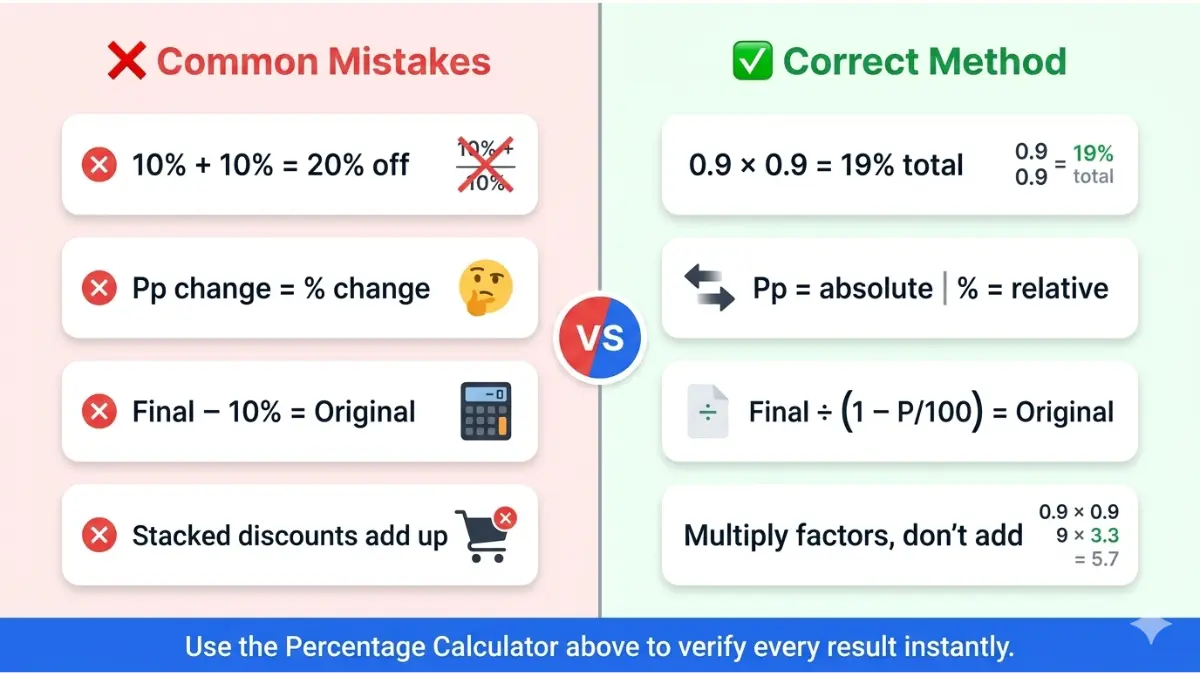
- 10% discount followed by another 10% discount ≠ 20% discount
- Actual combined discount = 1 − (0.90 × 0.90) = 19%
The more discounts you stack, the bigger the error. This matters in debt payoff strategies — learn how compounding works in our Debt Consolidation Guide.
Mistake 3: Using the Wrong Base in Reverse Calculations
Wrong approach: “A $110 item was 10% more than original. So original = $110 − $11 = $99.” Correct approach: Original = $110 ÷ 1.10 = $100.00
The difference seems minor. Over a portfolio of purchases or loan calculations, it adds up significantly.
Mistake 4: Percentage Increase vs. Percentage Difference
| Metric | Formula | Use Case |
|---|---|---|
| % Change | ((New−Old)/Old)×100 | Directional change over time |
| % Difference | (|A−B|/avg(A,B))×100 | Neutral comparison, no direction |
Using the wrong formula when analyzing investment returns or income growth can lead to misleading conclusions.
Quick Do/Don’t Reference
| ❌ Common Error | ✅ Correct Approach |
|---|---|
| Adding percentages to combine discounts | Multiply (1−P1) × (1−P2) |
| Subtracting % from final for original price | Divide final by (1 ± P/100) |
| Treating pp change as % change | Distinguish: pp is absolute; % change is relative |
| Ignoring base value size | Always check what the percent is applied to |
Frequently Asked Questions About Percentage Calculators
1. How do I calculate percentage of a number?
Multiply the number by the percentage, then divide by 100. Formula: (P/100) × Y = Result. Example: 25% of $800 = (25/100) × 800 = $200.
2. What is the formula for percentage change?
% Change = ((New − Old) ÷ |Old|) × 100. If your salary went from $50,000 to $54,500, that’s ((54,500 − 50,000) ÷ 50,000) × 100 = +9% increase.
3. What is the difference between percentage and percentage points?
Percentage points (pp) are the absolute arithmetic difference between two percentages. Percentage change is the relative difference. If a rate moves from 4% to 5%, that is 1 percentage point — but a 25% relative increase.
4. How do I calculate a percentage increase in salary?
Use: New Salary = Current Salary × (1 + Raise%/100). For a 6% raise on $70,000: $70,000 × 1.06 = $74,200. Use our Hourly to Salary Calculator if your pay is hourly.
5. How do I find the original price after a percentage discount?
Use the reverse percentage formula: Original = Final Price ÷ (1 − Discount%/100). If an item costs $680 after 15% off: $680 ÷ 0.85 = $800 original price.
6. What does 20% off mean in dollars?
It means you save 20% of the original price. On a $250 item: 20% × $250 = $50 saved, and you pay $200. Our tool calculates this instantly under “Decrease by %.”
7. How is percentage used in personal finance?
Percentages appear in every financial decision: interest rates, tax brackets, investment returns, savings rates, discount pricing, debt-to-income ratios, and insurance premium changes. Mastering percentage math is one of the highest-ROI financial skills you can develop.
8. Can I calculate percentage in multiple currencies?
Yes. This tool supports 22 currencies including USD, EUR, GBP, CAD, AUD, INR, JPY, and more. Toggle “Format numbers as currency” and select your currency from the dropdown. Use our Currency Converter for exchange rate conversions.
9. What is a reverse percentage calculator?
A reverse percentage calculator finds the original value before a percent change was applied. Formula: Original = Final ÷ (1 ± P/100). It’s essential for finding pre-tax prices, pre-discount values, or original investment amounts.
10. How do I calculate percent change between two numbers?
Subtract the old from the new, divide by the absolute value of the old, and multiply by 100. Example: Revenue changed from $120,000 to $96,000 → ((96,000 − 120,000) ÷ 120,000) × 100 = −20% decline.
11. What is 1% of 1 million dollars?
1% of $1,000,000 = $10,000. Formula: (1/100) × 1,000,000 = 10,000. This is why investment management fees expressed as “1% annually” on a $1M portfolio cost you $10,000 per year — compounding into over $200,000 in fees over 20 years.
⚠️ Disclaimer: This content is for educational and informational purposes only and does not constitute financial, tax, or investment advice. Percentage calculations shown are illustrative examples based on publicly available data. Tax rates and financial figures change annually. Always consult a qualified financial professional or certified public accountant (CPA) for decisions specific to your financial situation. Tax information references IRS.gov and BLS.gov for accuracy.
Informational disclaimer
The content on Finance Authority Hub is provided for general informational and educational purposes only and should not be considered personalized financial, investment, tax, legal, or professional advice. Financial decisions depend on your individual goals, income, risk tolerance, location, and regulatory situation. Before acting on any information, strategy, estimate, or calculator result, consult a qualified licensed professional who can evaluate your specific circumstances.