
Amortization Calculator – See Every Payment Instantly
Amortization Calculator
Compute payment amount, payoff date, total interest, and detailed amortization schedules (yearly, monthly, and full per-payment), including extra payments and one-time principal reductions.
Inputs
Results
Payment
—
Frequency: —
Payoff
—
Periods to payoff: —
Totals
Total interest: —
Total paid: —
Total extra applied: —
Rates
Loan amount: —
APR: —
Rate per period: —
Extra insights
First period: Interest — • Principal —
Last payment (estimated): —
Estimated interest saved vs no extra: — • Time saved: —
Educational estimate only; real lenders may use different rounding and posting rules.
Yearly summary
| Year | Paid | Principal | Interest | Extra | Ending balance |
|---|
Monthly summary (calendar months)
| Month | Paid | Principal | Interest | Extra | Ending balance |
|---|
Full amortization schedule (per payment)
| # | Date | Payment | Principal | Interest | Extra | Balance |
|---|
Results appear after you click “Calculate.”
In This Article
What Is an Amortization Calculator? (Your Complete 2026 Guide)
An amortization calculator is a financial tool that breaks down every loan payment into its two core components: principal (the amount you borrowed) and interest (the cost of borrowing). It shows you exactly how much you owe today, next year, and at every point until your loan is fully paid off.
In plain terms: Each month, you pay the same fixed amount — but the split between principal and interest changes over time.
Our free amortization calculator above does far more than the basic tools on Bankrate or NerdWallet. It computes:
- Monthly, biweekly, and weekly payment schedules
- Exact payoff date based on your start date
- Total interest paid over the full loan life
- Extra payment impact — both per-period and one-time lump sum
- Downloadable CSV — full schedule and monthly summary
- 22 currencies — USD, GBP, EUR, INR, CAD, AUD, and more
This guide covers everything you need to know about loan amortization, how to use the calculator, and — most importantly — how to save thousands in interest using smart payment strategies.
2026 Context: The average 30-year fixed mortgage rate in the U.S. is hovering around 6.5%–7.0%. On a $400,000 loan, that means you could pay over $500,000 in total interest over 30 years. Understanding your amortization schedule is no longer optional — it’s financial self-defense.
How to Use Our Amortization Calculator – Step-by-Step
Most amortization calculators online ask for three inputs and call it done. Ours gives you surgical precision. Here’s how to use every feature:
Step 1 — Select Your Currency Choose from 22 global currencies including USD, GBP, EUR, INR, CAD, and AUD. Supports all Tier 1 country formats automatically.
Step 2 — Enter Loan Amount (Principal) This is the total amount you borrowed, not the purchase price. For a mortgage, subtract your down payment. Example: $350,000.
Step 3 — Enter Your Interest Rate (APR %) Use your actual annual rate from your loan documents. Not sure of your APR vs. interest rate? Read our guide on APR vs. Interest Rate to avoid the most expensive confusion in personal finance.
Step 4 — Choose Payment Frequency
- Monthly (12 payments/year) — standard
- Biweekly (26 payments/year) — saves thousands
- Weekly (52 payments/year) — fastest payoff
Step 5 — Set Your Start Date The calculator uses this to generate a real calendar payoff date — down to the exact month and year.
Step 6 — Choose Your Calculation Mode
- “I know my term” — enter years + months, calculator gives your payment
- “I know my payment” — enter your payment amount, calculator shows payoff date
Step 7 — Add Extra Payments (The Power Feature)
- Extra per period — e.g., $200 more every month
- One-time extra — e.g., apply a $5,000 tax refund at payment #24
- The calculator automatically shows interest saved and time saved vs. no extra payments
After calculating, click “Toggle summary tables” for yearly/monthly breakdowns, or “Toggle full schedule” for a payment-by-payment view. Use “Download full CSV” to export your complete amortization table to Excel.
How Loan Amortization Works: Principal vs. Interest Explained
According to the Consumer Financial Protection Bureau (CFPB), amortization means paying off a loan through regular payments over time so that the amount you owe decreases with each installment.
The Amortization Formula
The monthly payment formula used in our calculator:
M = P × [r(1+r)ⁿ] ÷ [(1+r)ⁿ – 1]
Where:
- P = Principal (loan amount)
- r = Monthly interest rate (APR ÷ 12)
- n = Total number of payments (years × 12)
The Front-Loading Trap — Why You Pay Mostly Interest First
This is the most important concept most borrowers never understand. Early in your loan, the vast majority of every payment goes to interest, not reducing your balance. Here’s a real 2026 example:
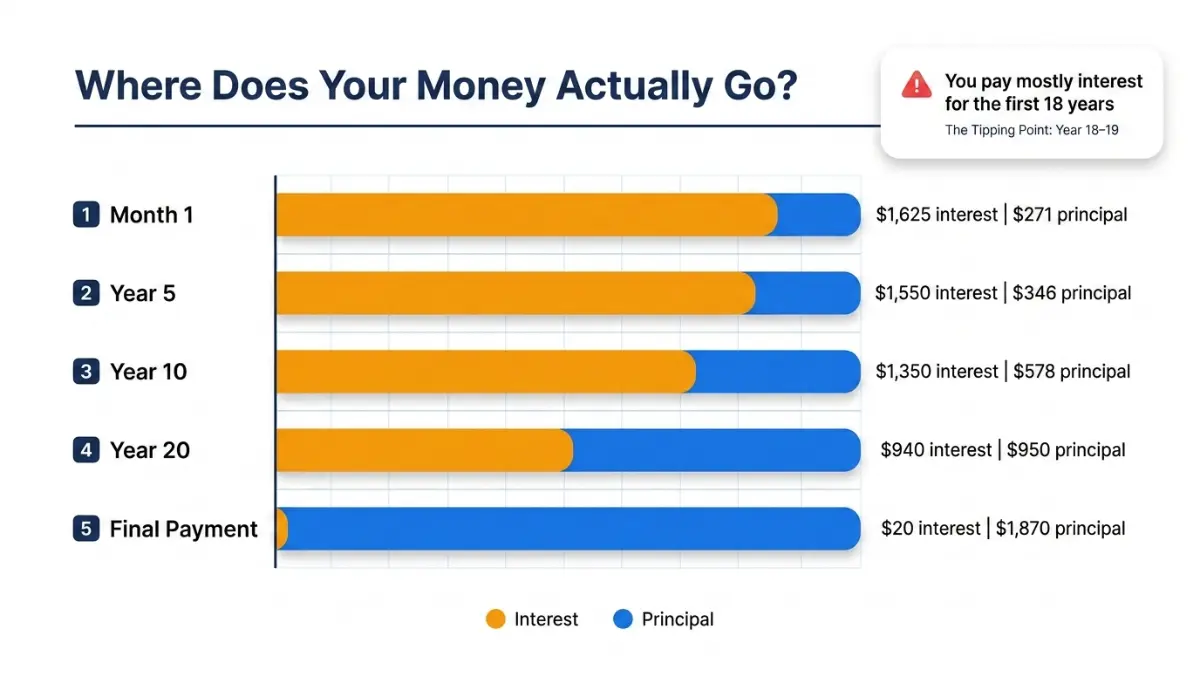
$300,000 loan | 6.5% APR | 30-year fixed
| Period | Monthly Payment | Goes to Interest | Goes to Principal | Remaining Balance |
|---|---|---|---|---|
| Month 1 | $1,896 | $1,625 | $271 | $299,729 |
| Year 5 (Month 60) | $1,896 | $1,506 | $390 | $277,084 |
| Year 10 (Month 120) | $1,896 | $1,344 | $552 | $247,197 |
| Year 20 (Month 240) | $1,896 | $905 | $991 | $165,809 |
| Final Payment | $1,896 | ~$10 | ~$1,886 | $0 |
Total Interest Paid: ~$382,633 — that’s $82,633 more than the original loan amount.
The Tipping Point — When You Finally Start Building Real Equity
On a standard 30-year loan, the tipping point — where more of your payment goes to principal than interest — doesn’t arrive until approximately Year 18–19. That’s 18 years of paying mostly interest before your balance starts falling quickly. A 15-year mortgage reaches its tipping point by Year 3–4.
What Loans Use Amortization?
Our calculator handles all major loan types, not just mortgages:
| Loan Type | Typical Term | Typical APR (2026 U.S.) | Use This Tool |
|---|---|---|---|
| 30-Year Mortgage | 30 years | 6.5%–7.2% | ✅ Yes |
| 15-Year Mortgage | 15 years | 5.9%–6.5% | ✅ Yes |
| Auto Loan | 3–7 years | 5.5%–8.5% | ✅ Yes |
| Personal Loan | 2–7 years | 8%–22% | ✅ Yes |
| Student Loan | 10–25 years | 5.5%–8%+ | ✅ Yes |
| Business Loan | 1–25 years | 6%–15% | ✅ Yes |
The CFPB confirms that auto loans and personal loans follow the same amortization principles as mortgages. Use our Auto Loan Calculator or Student Loan Calculator for type-specific results.
What Loans Are NOT Amortized?
Not all debt follows a standard amortization schedule:
- Credit cards — revolving debt, no fixed term
- Interest-only loans — payments cover only interest, principal stays flat
- Balloon loans — small payments with a large lump sum due at end
- Lines of credit (HELOC) — variable draw and repayment periods
Extra Payments on Your Amortization Schedule: How Much Can You Save?
This is where borrowers leave tens of thousands of dollars on the table. Extra payments hit your principal directly — and because interest is calculated on your remaining balance, every dollar extra you pay now eliminates a compounding chain of future interest charges.
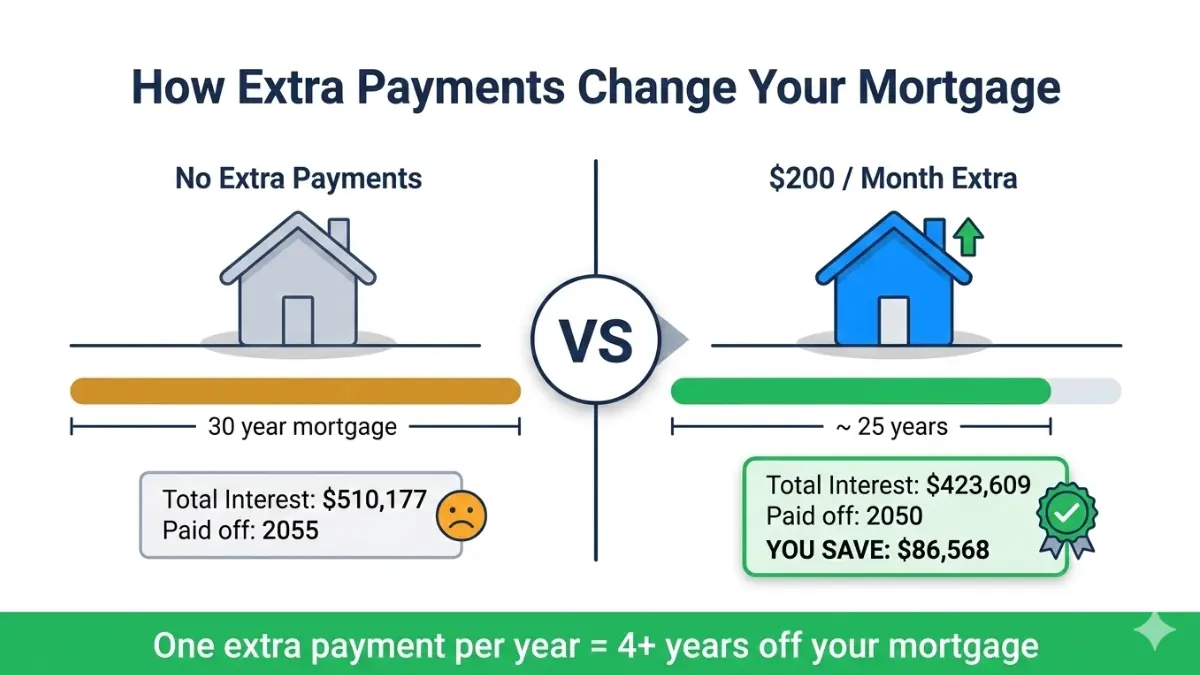
The Power of Extra Payments — Real 2026 Data
$400,000 loan | 6.5% APR | 30-year fixed | Monthly payment: $2,528
| Extra Payment/Month | Total Interest Paid | Interest Saved | Loan Paid Off In |
|---|---|---|---|
| $0 (baseline) | $510,177 | — | 30.0 years |
| $100/month | $462,844 | ~$47,333 | 27.2 years |
| $200/month | $423,609 | ~$86,568 | 25.1 years |
| $300/month | $390,552 | ~$119,625 | 23.3 years |
| $500/month | $336,141 | ~$174,036 | 20.3 years |
Key Insight: Adding just $200/month to a $400,000 mortgage saves nearly $87,000 in interest and cuts almost 5 years off your loan. Use the extra payment fields in our calculator to run your own numbers instantly.
The One-Time Lump Sum Strategy
Our calculator supports a feature no competitor offers for general loans: a one-time extra principal payment at a specific payment number. This is ideal for:
- Applying a tax refund (average U.S. tax refund in 2026: ~$3,000+) — see our Tax Refund 2026 Guide for tips on maximizing your refund
- Deploying a work bonus
- Using proceeds from the sale of an asset
Example: A $5,000 lump sum applied at Month 12 on a $300,000/6.5%/30-year loan saves approximately $18,000 in total interest — a 3.6x return on your extra payment.
⚠️ Important: Before making extra payments, always check your loan documents for prepayment penalties. Some lenders charge a fee for paying off a loan early. The CFPB’s mortgage key terms guide explains what to look for in your loan contract.
For high-interest debt like credit cards and personal loans, run your numbers through our Debt Consolidation Calculator before deciding where to direct extra cash.
Amortization Strategy: Which Loan Path Saves You the Most in 2026?
Not all loan structures are created equal. Choosing the right strategy at the start — or switching mid-loan — can mean the difference of $100,000+ in total cost. Here’s how the major paths compare on a $400,000 loan at comparable rates:

Master Strategy Comparison Table
| Strategy | Monthly Payment | Total Interest | Payoff Date | Best For |
|---|---|---|---|---|
| 30-year standard | ~$2,528 | ~$510,177 | 2055 | Tight budgets |
| 15-year standard | ~$3,490 | ~$228,009 | 2040 | High earners |
| 30-yr + biweekly | ~$1,264 (×26) | ~$422,000 | 2050 | Moderate savings |
| 30-yr + $200/mo extra | ~$2,728 | ~$423,609 | 2050 | Flexible approach |
| 30-yr + $500/mo extra | ~$3,028 | ~$336,141 | 2045 | Aggressive payoff |
30-Year vs. 15-Year Mortgage — Which Is Better?
The 15-year mortgage saves over $282,000 in interest on a $400,000 loan. But the monthly payment is ~$962 higher. The right answer depends on your cash flow and investment alternatives. Our full 15 vs. 30-Year Mortgage Comparison breaks this down with 2026 rate data.
Does Biweekly Payment Really Save Money?
Yes — significantly. Paying half your monthly payment every two weeks results in 26 half-payments per year, which equals 13 full monthly payments instead of 12. According to the CFPB, biweekly payments can shorten a 30-year mortgage by 4–6 years and save tens of thousands in interest. On a $400,000/6.5% loan: biweekly saves ~$88,000 and pays off in approximately 25 years.
When Should You Refinance Your Amortization Schedule?
Refinancing resets your amortization clock — you go back to paying mostly interest from Day 1. This is the refinance trap most homeowners don’t see coming.
Refinancing makes sense when:
- Your new rate is at least 0.75%–1.0% lower than current
- You plan to stay in the home past the break-even point (typically 18–36 months)
- You’re refinancing early in your loan term (before Year 7–8)
Run your numbers with our Mortgage Refinance Calculator before signing anything.
Should You Pay Off Your Loan Early or Invest?
This is the question competitors never answer. The math depends on your mortgage rate vs. your expected investment return:
| Your Mortgage APR | S&P 500 Avg Return (10-yr) | Best Strategy |
|---|---|---|
| Below 4% | ~10% historical | Invest the difference |
| 4%–6% | ~10% historical | Split: invest + extra payments |
| Above 6.5% | ~10% historical | Extra payments first |
| Above 8% | ~10% historical | Aggressive extra payments |
At today’s 6.5%–7.0% mortgage rates, extra payments offer a guaranteed 6.5%–7.0% return (in saved interest) — competitive with many conservative investment vehicles. Use our Investment Calculator to model both scenarios side by side. For long-term retirement planning, see our Retirement Calculator to ensure you’re not over-prioritizing debt payoff at the expense of compound growth.

Amortization Calculator — Frequently Asked Questions
1. What is an amortization calculator?
An amortization calculator computes your loan payment amount, shows the principal vs. interest split for every payment, and generates a full amortization schedule with your payoff date and total interest cost.
2. How do I read an amortization schedule?
Each row shows one payment period. Columns typically include: payment number, date, total payment, amount to principal, amount to interest, and remaining balance. Early rows show mostly interest; later rows show mostly principal.
3. What is the amortization formula?
M = P × [r(1+r)ⁿ] ÷ [(1+r)ⁿ – 1], where P = principal, r = monthly rate (APR÷12), n = total payments. Our calculator applies this formula automatically for monthly, biweekly, and weekly frequencies.
4. Does extra payment reduce principal or interest?
Extra payments reduce principal directly. Because interest is calculated on your remaining balance, reducing principal now lowers every future interest charge — creating a compounding savings effect.
5. Is biweekly better than monthly payment?
In most cases, yes. Biweekly payments result in one extra full payment per year, cutting 4–6 years off a 30-year mortgage and saving tens of thousands in interest. Always confirm your lender accepts biweekly payments and applies them to principal correctly.
6. What happens to my amortization if I refinance?
Refinancing resets your schedule to Day 1. You start paying mostly interest again. This is why refinancing late in a loan term — say, Year 22 of a 30-year mortgage — often makes little financial sense even if the rate is lower.
7. Can I use this calculator for auto loans and personal loans?
Yes. Our amortization calculator works for any fixed-rate, fixed-term amortizing loan: mortgage, auto, personal, student, business, and more. For specialized calculations, try our Auto Loan Calculator or Business Loan Calculator.
8. What is negative amortization?
Negative amortization occurs when your payment is too low to cover the interest owed. The unpaid interest gets added to your loan balance, which actually grows instead of shrinking. The CFPB warns that negative amortization can put you at serious financial risk, including the possibility of owing more than your home is worth.
9. How much interest will I pay on a $300,000 mortgage?
At 6.5% APR over 30 years: approximately $382,633 in total interest. At 6.5% over 15 years: approximately $167,493. The difference — $215,140 — is purely the cost of the longer loan term.
10. What is the tipping point on a 30-year mortgage?
The tipping point — where more of your payment goes to principal than interest — occurs around Year 18–19 on a standard 30-year fixed mortgage. On a 15-year mortgage, it occurs by approximately Year 3–4.
11. Does your amortization calculator support multiple currencies?
Yes. Our calculator supports 22 currencies including USD, EUR, GBP, INR, CAD, AUD, NZD, SGD, JPY, AED, and more. Select your currency in the first dropdown before calculating.
Expert Insight — Laura M. Bennett, CFP® Senior Financial Planner, financeauthorityhub.com Expert Panel
“One of the most powerful — and most overlooked — strategies I recommend to clients is making even one extra mortgage payment per year. On a $350,000 loan at 6.5%, that single additional payment annually can save over $60,000 in interest and cut more than 4 years from the loan. Your amortization calculator shows you this instantly. Run the numbers before you decide your extra cash has better uses.”
📌 Disclaimer: This amortization calculator and the information in this article are provided for educational and informational purposes only. Results are mathematical estimates based on user-provided inputs and do not account for taxes, insurance, lender fees, PMI, or variable rate adjustments. This content does not constitute financial, legal, or lending advice. Always consult a licensed financial advisor or mortgage professional before making loan decisions. Rates referenced reflect general 2026 U.S. market conditions and are subject to change.
Explore more tools: Mortgage Calculator | Home Affordability Calculator | Debt-to-Income Ratio Calculator | Compound Interest Calculator
Informational disclaimer
The content on Finance Authority Hub is provided for general informational and educational purposes only and should not be considered personalized financial, investment, tax, legal, or professional advice. Financial decisions depend on your individual goals, income, risk tolerance, location, and regulatory situation. Before acting on any information, strategy, estimate, or calculator result, consult a qualified licensed professional who can evaluate your specific circumstances.