
W9 Form 2026: Avoid 24% Penalty + Fill Guide
Learn how to fill out W9 form correctly in 2026. Avoid the 24% backup withholding penalty with our line-by-line guide, mistake prevention tips, and real-world examples. Includes free IRS download.
In This Article
What Is a W9 Form? (2026 Official Guide)
A W9 form is an IRS document that independent contractors, freelancers, and businesses use to provide their Taxpayer Identification Number (TIN) to clients who pay them $600 or more annually. The form certifies your tax status and prevents 24% backup withholding on your payments.
The IRS updated W9 requirements in 2026 to strengthen enforcement against misreported income. If you submit incorrect information or refuse to provide a W9 form when legally required, the IRS can withhold 24% of your payments immediately—a penalty that affects over 4.2 million independent contractors annually according to IRS Publication 1281.
Who needs to fill out a W9 form in 2026:
- Independent contractors earning $600+ from any single client
- Freelancers providing professional services
- LLC owners receiving business payments
- Sole proprietors working with multiple companies
- Real estate agents receiving commission payments
The stakes are higher than most people realize. The Treasury Inspector General for Tax Administration reported that backup withholding enforcement increased 34% since 2024, meaning incorrect W9 forms now trigger faster IRS action than ever before.
Understanding how to complete your W9 form correctly protects your income and keeps you compliant with federal tax law. This comprehensive guide walks you through every line, explains penalty triggers, and shows you exactly how to avoid the costly mistakes that trap thousands of contractors each year.
Penalty Prevention Deep Dive
The 24% Backup Withholding Penalty (How to Avoid It)
What Triggers Backup Withholding in 2026
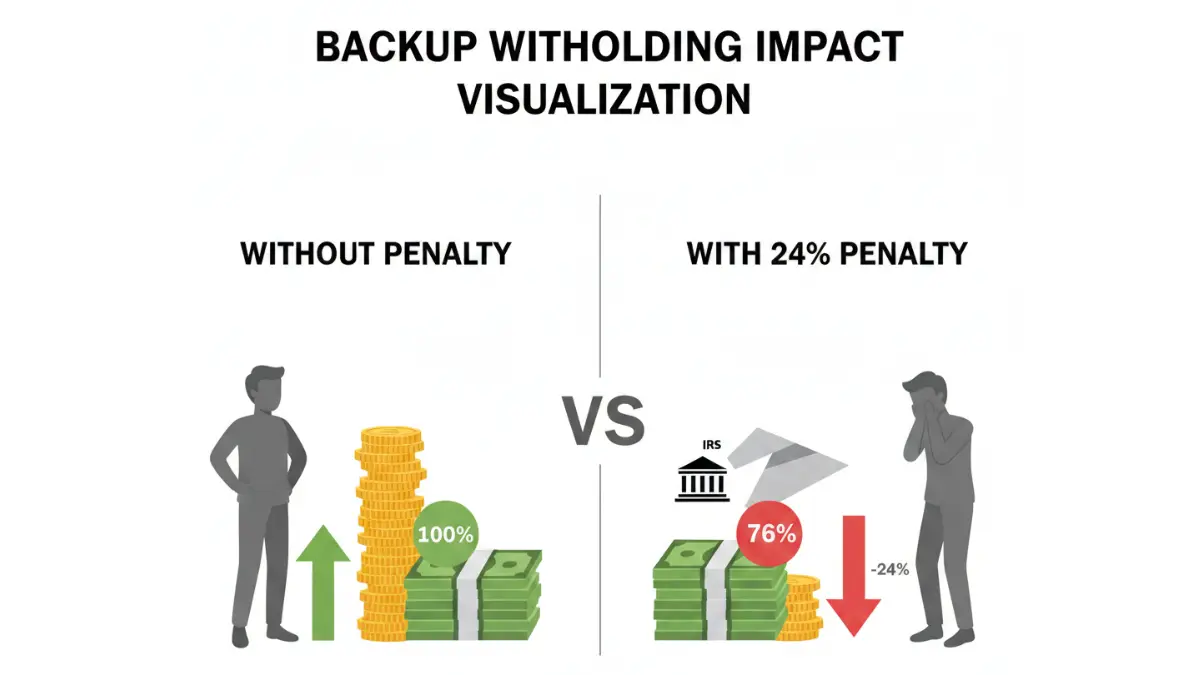
Backup withholding occurs when the IRS requires your clients to withhold 24% of your payments before sending you money. This happens automatically when you provide an incorrect TIN, fail to report all income, or ignore IRS notices about underreported earnings.
The penalty isn’t theoretical—it impacts real money. If you earn $50,000 as an independent contractor and trigger backup withholding, you lose $12,000 immediately to the IRS. You’ll eventually recover most of this when filing your annual tax return, but the cash flow damage can devastate small businesses.
Real-World Penalty Calculation Examples
| Annual Payment | 24% Withholding | Your Net Payment | Lost Cash Flow |
|---|---|---|---|
| $25,000 | $6,000 | $19,000 | $6,000 until tax filing |
| $50,000 | $12,000 | $38,000 | $12,000 until tax filing |
| $75,000 | $18,000 | $57,000 | $18,000 until tax filing |
| $100,000 | $24,000 | $76,000 | $24,000 until tax filing |
Case Study: A graphic designer in Austin, Texas submitted a W9 form with her old business name instead of her legal name. The mismatch triggered automatic backup withholding on her $68,000 annual contract. She lost access to $16,320 for eight months until her tax refund processed—nearly bankrupting her small studio.
Seven Red Flags That Trigger IRS Scrutiny
- Mismatched name between W9 and tax returns
- Wrong or outdated TIN/EIN number
- Missing signature or date
- Incorrect business entity classification
- Using SSN when EIN is required for your business structure
- Failing to update W9 after business structure changes
- Claiming exempt status without legitimate reason
The IRS Taxpayer Advocate Service reports that 68% of backup withholding cases stem from simple name mismatches that contractors could have prevented with careful form review.
What This Means For You: Always verify your legal name matches your most recent tax return exactly. If you’ve changed your business name or gotten married, update your information with the Social Security Administration before submitting new W9 forms.
Line-by-Line Fill Guide (Visual Walkthrough)
How to Fill Out W9 Form 2026 (Step-by-Step)
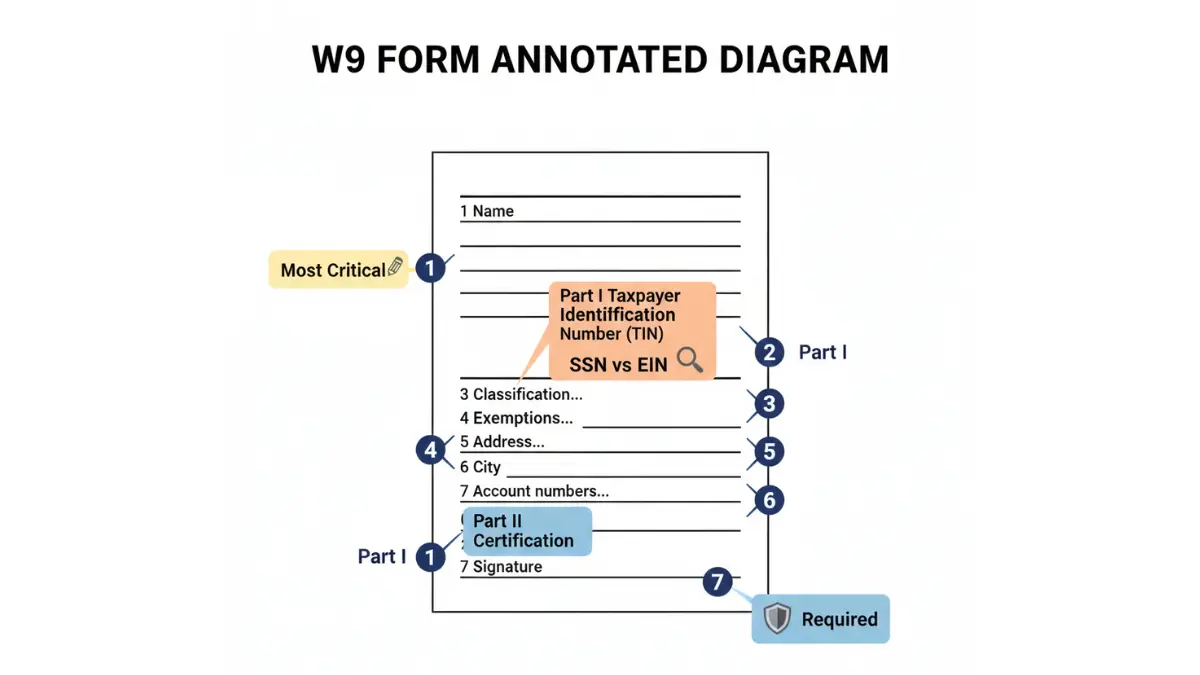
Line 1: Name Field (Match Your Tax Return Exactly)
Enter your legal name exactly as it appears on your most recent tax return. This is the single most important field on the entire form—any variation triggers backup withholding.
For individuals: Use your full legal name (John David Smith, not John Smith)
For businesses: Use your legal business name as registered with your state
For DBAs: Your legal name goes on Line 1; your “doing business as” name goes on Line 2
Common mistake: Married contractors who changed their last name but haven’t updated their Social Security records. Update your name with the SSA first, file an updated tax return, then submit your W9 form.
Line 2: Business Name/DBA (When to Use This)
Only fill out Line 2 if you operate under a different business name than your legal name. Most sole proprietors leave this blank.
Fill this line if:
- You have a registered DBA (John Smith DBA Smith Consulting)
- Your LLC name differs from your personal name
- You operate multiple business entities
Leave blank if:
- You’re a sole proprietor using your legal name
- You’re an individual contractor without a business entity
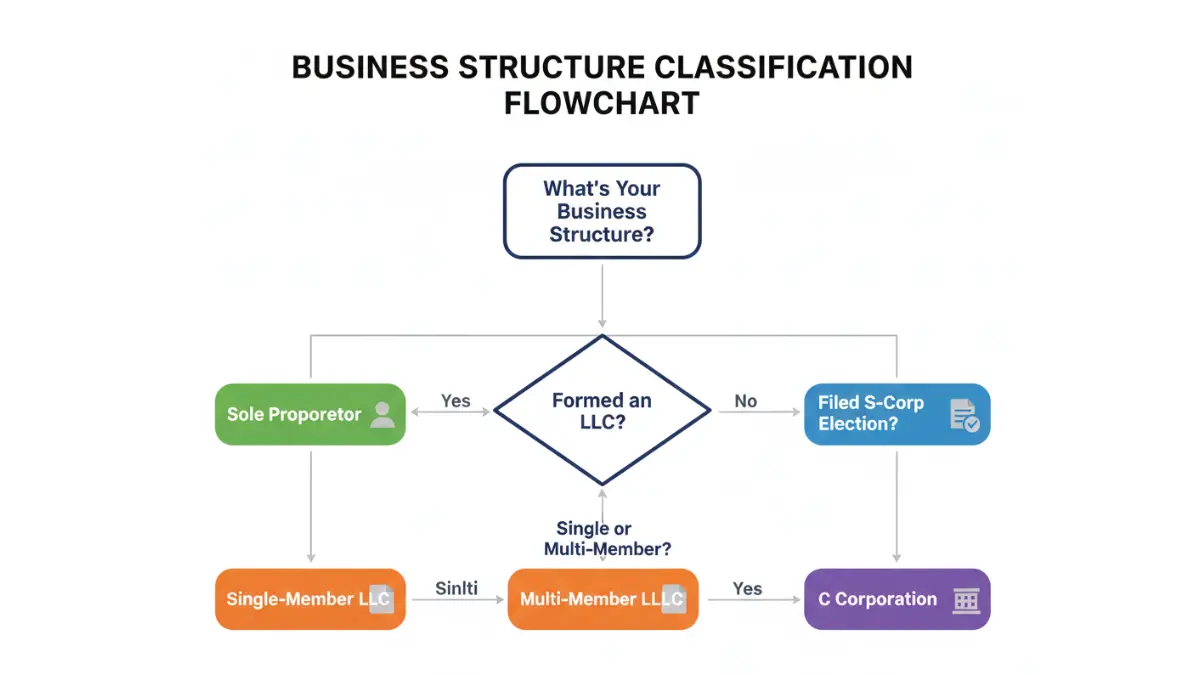
Line 3: Federal Tax Classification (LLC Decision Tree)
Check ONE box that matches your business structure. This determines how the IRS taxes your income and which tax brackets apply to your earnings.
| Your Business Type | Box to Check | Notes |
|---|---|---|
| Individual/Sole Proprietor | Individual/sole proprietor | Default for most freelancers |
| Single-Member LLC | Single-member LLC | Most common for established contractors |
| Multi-Member LLC | Partnership | Requires separate partnership return |
| S Corporation | S Corporation | Must file election with IRS first |
| C Corporation | C Corporation | Separate corporate entity |
| Trust/Estate | Trust/estate | Requires legal documentation |
LLC Confusion Resolver: If you formed an LLC but never filed IRS Form 2553 for S-Corp status, you’re a “disregarded entity”—check “Single-member LLC” and fill in “C” for corporation, “P” for partnership, or leave blank for disregarded entity in the box.
Line 4: Exemptions (99% of People Leave This Blank)
Unless you’re a government entity, corporation, or specific exempt payee under IRS rules, skip this line entirely. Independent contractors, freelancers, and small businesses are NOT exempt from backup withholding.
Only use exemption codes if you are:
- A corporation (exempt code 1)
- A tax-exempt organization (exempt code 5)
- The U.S. Government (exempt code 3)
- A real estate agent for FIRPTA transactions (exempt code 9)
The IRS Instructions for Form W-9 list all 13 exemption codes. Most readers of this guide should leave this section blank.
Lines 5-6: Address Requirements (PO Box Rules)
Enter your current mailing address. The IRS matches this against your tax return address, so consistency matters.
PO Box rules: You can use a PO Box ONLY if it’s your official business address on file with USPS. Otherwise, use your physical street address.
State-specific note: California and New York require physical addresses for certain business registrations, even if you use a PO Box for mail.
Line 7: Account Numbers (When Required)
Most contractors leave this blank. Only fill in account numbers if the requester specifically asks for them to distinguish between multiple accounts or contracts.
Part I: TIN Section (SSN vs. EIN Decision Guide)
Enter your Taxpayer Identification Number—either your Social Security Number (SSN) or Employer Identification Number (EIN).
Use your SSN if:
- You’re a sole proprietor with no employees
- You haven’t applied for an EIN
- You operate as an individual contractor
Use your EIN if:
- You have employees working for you
- Your business is taxed as a partnership, corporation, or multi-member LLC
- You want privacy protection (EIN doesn’t expose your SSN)
Apply for a free EIN instantly through the IRS EIN Online Application. The process takes 15 minutes and provides immediate confirmation.
Part II: Certification & Signature (Common Mistakes)
Read the three certification statements carefully. Your signature confirms:
- The TIN you provided is correct
- You’re not subject to backup withholding (or you are, and you’ve acknowledged it)
- You’re a U.S. citizen or resident alien
Fatal mistake: Signing without verifying your TIN is correct. If you’re unsure whether your EIN is accurate, check it through the IRS Business & Specialty Tax Line at 800-829-4933 before signing.
Date your signature with the current date—signatures more than 30 days old may be rejected by cautious clients who want current documentation.
Advanced Scenarios & Special Cases
W9 Special Situations & When to Use Alternatives
Independent Contractor vs. Employee (W9 vs. W4)
Confusion between W9 and W4 forms costs contractors thousands annually. If your client controls when, where, and how you work, you’re likely an employee who should complete a W4 form—not an independent contractor filing a W9.
W9 indicators (independent contractor):
- You set your own schedule
- You use your own equipment
- You work for multiple clients simultaneously
- You invoice for completed work
- You face profit/loss risk on projects
W4 indicators (employee):
- Company sets your work hours
- Company provides equipment and training
- You work exclusively for one employer
- You receive regular paychecks with withholding
- You’re eligible for company benefits
The Department of Labor Independent Contractor Rule provides detailed classification guidance. Misclassification can result in back taxes, penalties, and legal liability for both parties.
International Contractors (W9 vs. W8-BEN Comparison)
U.S. companies cannot accept W9 forms from foreign contractors. If you live outside the United States or lack U.S. citizenship/residency, request IRS Form W-8BEN instead.
| Factor | W9 Form | W-8BEN Form |
|---|---|---|
| User | U.S. persons only | Foreign individuals |
| Tax Treaty | Not applicable | May reduce withholding to 0-15% |
| Withholding | 24% if incorrect | 30% default, lower with treaty |
| Validity | No expiration | Expires every 3 years |
Foreign contractors often face 30% withholding on U.S.-source income unless their country has a tax treaty with the United States. The IRS Tax Treaty Table shows reduced rates for specific countries.
When You Can Legally Refuse to Fill Out a W9
You cannot refuse a W9 if you’re receiving $600+ in payments from a U.S. business. Refusal triggers automatic 24% backup withholding and potential IRS investigation.
Limited exception: If providing your SSN creates identity theft concerns, apply for an EIN through the IRS website and use that instead. This protects your Social Security Number while maintaining compliance.
Privacy-conscious contractors should always use an EIN for business transactions rather than exposing their SSN on multiple W9 forms distributed to various clients.
When to Update Your W9 (Seven Triggering Events)
Submit a new W9 form whenever:
- Your legal name changes (marriage, divorce, legal name change)
- Your business entity type changes (sole prop to LLC, LLC to S-Corp)
- Your TIN changes (you get a new EIN or correct an error)
- You move to a new state (some states require additional documentation)
- Your business name changes (DBA registration or rebranding)
- You discover errors on your previously submitted form
- A client specifically requests an updated form
Proactive updates prevent payment delays and backup withholding. Many contractors using debt consolidation strategies to manage business expenses find that W9 errors compound their cash flow problems when the IRS withholds 24% of their income.
Common Mistakes & Troubleshooting
9 Costly W9 Mistakes (And How to Fix Them)
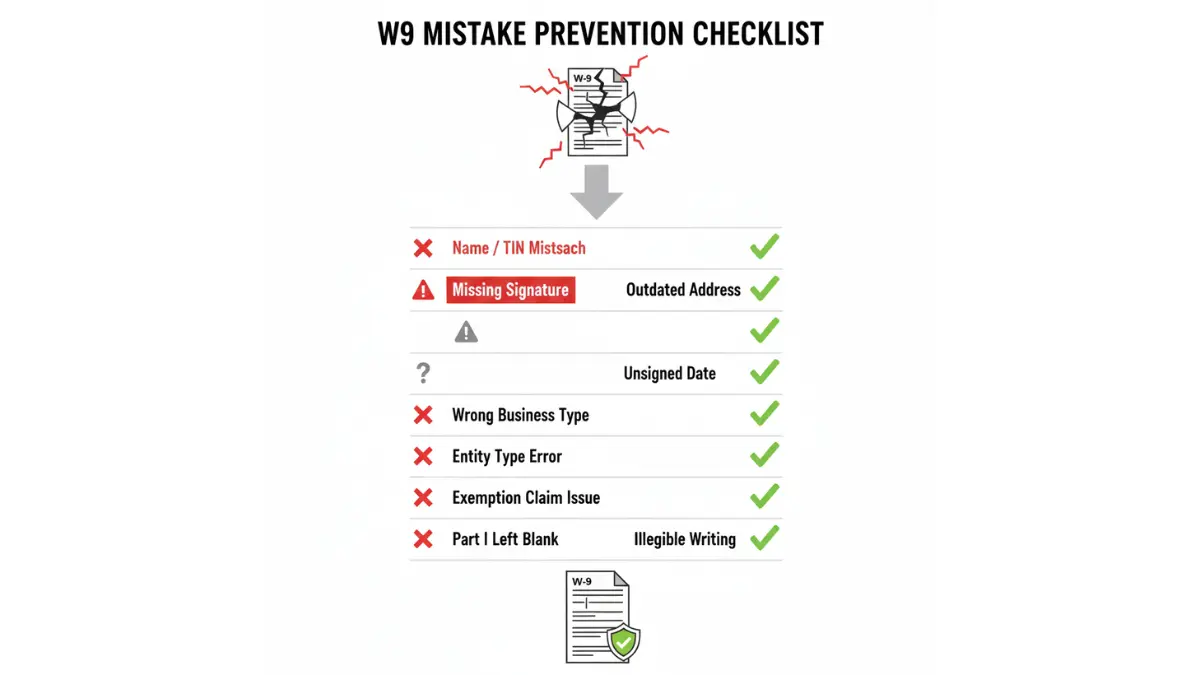
1. Name/TIN Mismatch
Mistake: Name on W9 doesn’t match IRS records for the TIN provided.
Fix: Verify your exact legal name through SSA.gov or your last tax return before submitting.
Consequence: Immediate backup withholding on all future payments.
2. Using Wrong Business Classification
Mistake: Checking “Individual” when you’ve formed an LLC.
Fix: Review your business formation documents and match the classification exactly.
Consequence: Incorrect 1099 forms and potential audit triggers.
3. Outdated EIN After Business Structure Change
Mistake: Using your sole proprietor SSN after forming an LLC that needs separate EIN.
Fix: Apply for new EIN immediately when changing business structure.
Consequence: IRS rejects the TIN and initiates backup withholding.
4. Missing Signature
Mistake: Forgetting to sign the certification section.
Fix: Always review completed form before submission—signature is legally required.
Consequence: Invalid form, delayed payments, potential 24% withholding.
5. Using Personal SSN for Multi-Member LLC
Mistake: Providing personal SSN when business requires separate EIN.
Fix: Multi-member LLCs must have EINs—obtain one through IRS.gov before submitting W9.
Consequence: IRS penalties and incorrect tax reporting.
6. Claiming False Exempt Status
Mistake: Checking exempt payee code without legal qualification.
Fix: Leave exemption section blank unless you’re specifically listed in IRS Publication 1281.
Consequence: Backup withholding plus additional penalties for false certification.
7. Not Updating After Name Change
Mistake: Submitting W9 with maiden name months after marriage.
Fix: Update SSN records first, then submit new W9 with current legal name.
Consequence: TIN/name mismatch triggers immediate 24% withholding.
8. Transposed TIN Digits
Mistake: Typing SSN or EIN with reversed or incorrect numbers.
Fix: Double-check every digit against official documentation before submission.
Consequence: Failed IRS verification and backup withholding.
9. Using Spouse’s SSN
Mistake: Married couples using one spouse’s SSN for both incomes.
Fix: Each person earning income needs their own W9 with their own TIN.
Consequence: Underreported income, audit risk, and tax penalties.
Already Submitted Wrong Information?
File Form W-9S (Substitute Form W-9) with corrected information immediately. Contact your client’s accounts payable department and request they update their records. The faster you correct errors, the better your chances of stopping backup withholding before it starts.
The IRS typically processes corrections within 45-60 days. During this time, backup withholding may continue until your corrected information updates in IRS systems.
Frequently Asked Questions About W9 Forms
1. Where can I download a W9 form for 2026?
Download the official IRS Form W-9 directly from the IRS Forms & Publications page. The form is free and includes detailed instructions. Always use the current year version to ensure compliance with the latest IRS requirements.
2. Do I use my SSN or EIN on a W9?
Use your SSN if you’re a sole proprietor without employees. Use your EIN if you have employees, operate as a multi-member LLC, or want to protect your Social Security Number from exposure. You can apply for a free EIN online through the IRS website in about 15 minutes.
3. What happens if I don’t submit a W9?
Your client must withhold 24% of your payments for backup withholding and send it directly to the IRS. You’ll receive 24% less payment until you provide a valid W9 form. The withheld amount can only be recovered when you file your annual tax return.
4. How long is a W9 form valid?
W9 forms don’t expire, but you must submit an updated form whenever your name, TIN, or business structure changes. Many businesses request new W9 forms annually as part of their compliance procedures, even though it’s not legally required.
5. Can I fill out a W9 electronically?
Yes. The IRS accepts electronic W9 forms with digital signatures. Many accounting software platforms like QuickBooks and FreshBooks offer built-in W9 collection features. Ensure your electronic signature meets IRS requirements for legally binding documents.
6. What’s the difference between W9 and W2?
A W9 is for independent contractors to provide their TIN to clients. A W2 is for employees and shows wages, taxes withheld, and benefits. Contractors receive 1099 forms based on their W9 information, while employees receive W2 forms showing payroll taxes withheld.
7. Do I need a new W9 if I move?
Yes, submit an updated W9 with your new address. While address changes alone don’t trigger backup withholding, keeping your information current prevents payment delivery problems and maintains accurate IRS records for your business location.
8. What is backup withholding on a W9?
Backup withholding is when the IRS requires your clients to withhold 24% of your payments and send it directly to the government. This happens automatically when you provide incorrect TIN information, fail to report all income, or ignore IRS underreporting notices.
9. Can an LLC use a W9 form?
Yes. LLCs use W9 forms to provide their EIN to clients. Single-member LLCs check the “Single-member LLC” box, while multi-member LLCs check “Partnership.” Make sure your business classification on Line 3 matches your IRS election status.
10. Is there a deadline to submit a W9?
Clients typically request W9 forms before your first payment or at the beginning of each calendar year. While there’s no specific IRS deadline, failing to provide a W9 when requested triggers immediate 24% backup withholding on your payments.
11. What if I made a mistake on my W9?
Submit a corrected W9 immediately using the same form. Write “CORRECTED” at the top, fill in the accurate information, sign, and date it. Contact your client’s accounting department to ensure they update their records and stop any backup withholding.
Download Your Official W9 Form
Get the official IRS Form W-9 (Rev. December 2025) as a fillable PDF:
📥 Download from IRS.gov
For additional tax forms and resources, visit our tax planning resource center where you can access calculators for debt consolidation, mortgage planning, and comprehensive tax preparation guides.
Disclaimer
This article is for educational purposes only and does not constitute tax, legal, or financial advice. Tax laws and IRS regulations change frequently. Always consult with a qualified CPA, enrolled agent, or tax attorney for guidance specific to your situation. While we strive for accuracy, verify all information with official IRS publications at IRS.gov before making tax-related decisions. Form requirements and penalty structures may change; check the most current IRS guidelines before submitting any tax documents.
Related Articles
 Tax Filing & Deductions
TurboTax Free 2026: Only 37% Qualify — Do You Make the Cut?
February 7, 2026 Tax Filing & Deductions
Tax Refund 2026: Who Gets $1,000 More & How Fast
February 7, 2026 Tax Filing & Deductions
W-4 Form 2026 Complete Guide: How Tips, Overtime & the $2,200 Child Tax Credit Change Your Paycheck This Year
February 10, 2026 Tax Filing & Deductions
Tax Refund Up 20% in 2026: How to Claim Your $1,000 Starting January 26
January 17, 2026 Tax Filing & Deductions
W2 Form 2026: Read Every Box + Avoid Costly Mistakes
February 9, 2026 Tax Filing & Deductions
EFTPS 2026: Individual Shutdown + New Payment Options
February 11, 2026 Tax Filing & Deductions
Structured Settlement Payments, Taxes, and Your Rights
May 7, 2026 Tax Filing & Deductions
1040 Tax Form 2026: Avoid 7 Costly Filing Mistakes
February 10, 2026 Tax Filing & Deductions
eFile Free in 2026: Get Your Refund 3x Faster [IRS]
February 7, 2026
Informational disclaimer
The content on Finance Authority Hub is provided for general informational and educational purposes only and should not be considered personalized financial, investment, tax, legal, or professional advice. Financial decisions depend on your individual goals, income, risk tolerance, location, and regulatory situation. Before acting on any information, strategy, estimate, or calculator result, consult a qualified licensed professional who can evaluate your specific circumstances.